
70–80% Touchless Rate: 3 Way Match Automation for Email Heavy AP Teams

Automated 3-way matching compares the purchase order, goods receipt, and supplier invoice, then auto-approves any invoice that falls inside your tolerance rules and routes everything else to the right person for review. AP teams that automate this comparison typically see higher touchless rates, fewer manual keying errors, and exceptions resolved in hours instead of days. If your invoices come in mostly through email and PDFs rather than a clean supplier portal, the payoff is even bigger.
TL;DR:
Automating 3-way matching increases touchless invoice processing rates to around 70 to 80 percent with proper setup, significantly reducing manual comparisons.
The effectiveness of automation heavily depends on clean vendor master data, strict PO discipline, and accurate, timely posting of goods receipts.
Handling exceptions such as missing POs, partial receipts, multi-PO invoices, and vendor mismatches requires configurable rules and auto-splitting features to minimize manual intervention.
Telegraphed for email-heavy workflows, AI-driven extraction that reads free-text and unstructured documents can cut manual data entry by up to 90 percent.
Incremental implementation with phased pilots before full-scale rollout yields better long-term results and helps optimize tolerance settings based on actual exception patterns.
Table of Contents
-
Why Automate 3-Way Matching: Benefits, ROI, and KPIs to Track
-
Implementation Checklist: Piloting and Scaling 3-Way Match Automation
-
Choosing the Right Technology for Email-Heavy Invoice Workflows
-
How 3-Way Match Automation Changes Supplier Relationships and Payment Cycles
-
Security and Compliance Considerations for Automated Matching
-
Connecting 3-Way Matching to the Rest of Your Financial Stack
-
Publisher Perspective: Where AP Automation Is Actually Headed
What Is 3-Way Matching, and When Do You Need It?
Three-way matching checks a purchase order against a goods receipt note (GRN) and the supplier invoice before a payment goes out. The PO confirms what was ordered and at what price. The GRN confirms what actually showed up on the dock. The invoice confirms what the supplier wants to be paid. When the three agree within tolerance, the invoice clears. When they don’t, it stops.
This isn’t the only matching model, and using it everywhere is a mistake plenty of AP teams make. Ramp’s breakdown of the 3-way match lays out the mechanics clearly: matches within tolerance post automatically, and anything outside it gets flagged for review. That’s the whole engine in one sentence.
Here’s how the three models actually differ in practice:
-
2-way matching compares only the PO and invoice. It works fine for services, subscriptions, or low-dollar purchases where there’s no physical delivery to verify.
-
3-way matching adds the goods receipt. Use it for physical inventory, raw materials, and any purchase where “did we actually get this” is a real question, not a formality.
-
4-way matching adds an inspection or quality report on top of the GRN. Reserve it for regulated industries, high-value capital equipment, or anything where a bad unit slipping through costs more than the delay.
Most 3-way match systems check line-level quantity, unit price, and total against the PO, with header-level checks on vendor, currency, and payment terms. Freight and tax are usually where legitimate small variances show up, so smart tolerance rules exclude or separately bucket those line items rather than forcing an exact match on the whole invoice total.
Why Automate 3-Way Matching: Benefits, ROI, and KPIs to Track
The case for automation comes down to one number: how much of your invoice volume clears without a human touching it. That’s your touchless rate, and it’s the single KPI that tells you whether the system is actually working or just adding another screen for someone to babysit.
Vendor-reported benchmarks put achievable touchless processing rates at 70 to 80 percent once automation is fully configured, with per-invoice matching time dropping from the typical 15 to 20 minutes of manual comparison to something close to instant for clean matches. Those figures come from vendor case studies, so treat them as a target rather than a guarantee. Your actual rate depends heavily on PO discipline and how messy your supplier invoice formats are.
Pro Tip: Track your touchless rate weekly for the first quarter after go-live, not monthly. Early tolerance misconfigurations show up fast in weekly data and get buried in a monthly average.
Beyond touchless rate, four KPIs matter for judging whether your matching program is healthy:
-
Auto-match rate: percentage of invoices that clear without manual intervention.
-
Exception rate: percentage flagged, broken down by exception type so you can see which category is driving volume.
-
Average resolution time: how long an exception sits open before it’s cleared, ideally tracked by owner.
-
GR/IR aging: how long goods-receipt-to-invoice-receipt discrepancies stay unreconciled on the balance sheet.
The financial upside isn’t limited to labor hours. Automated matching catches duplicate invoice submissions before they hit the payment run, something manual reviewers miss more often than they’d like to admit when they’re working through a stack of PDFs at month end. It also builds a clean audit trail automatically, since every match decision, tolerance override, and approval gets logged with a timestamp and a name attached. And it improves supplier relationships in a way that’s easy to overlook: clean invoices get paid faster, and suppliers with a track record of clean invoices start noticing they’re getting paid on time more consistently than the vendor down the street still emailing PDFs with typos in the PO number.
How Automated 3-Way Matching Works End to End
Automation isn’t one piece of software doing everything. It’s a chain of four distinct stages, and where each one breaks down tells you exactly what to fix.
1. Capture: getting the documents into the system
Invoices arrive through email attachments, supplier portals, or EDI feeds, and each channel has different tradeoffs. EDI is the cleanest for high-volume, standardized suppliers but requires setup on both ends and rarely covers your entire vendor base. Portals centralize submission but push friction onto smaller suppliers who won’t bother logging in. Email remains the dominant channel for a huge share of B2B invoice volume precisely because it requires zero setup on the supplier’s end. If most of your invoices show up as PDF attachments or inline text in an inbox, your capture strategy needs to be built around email first, not treated as an edge case.
2. Extraction: pulling structured data out of unstructured documents
This is where a lot of AP automation projects quietly fail. Template-based OCR systems need a pre-built layout for every supplier format, and practitioners consistently report that rigid, template-dependent OCR is a common point of failure once a supplier changes their invoice layout or a new vendor sends something the system has never seen. AI-driven extraction that reads free-text emails, scanned attachments, and varied PDF layouts without a per-vendor template avoids that maintenance trap entirely, which matters more the larger and more varied your supplier base gets.
3. Matching engine: comparing the three documents
The matching engine pulls the PO, GRN, and invoice data and checks them field by field. Two design choices determine how well this works in practice:
-
Header versus line-level matching. Header-level matching checks totals only, which is fast but blind to a line-item substitution that nets out to the same invoice total. Line-level matching checks each item individually and catches that kind of error, at the cost of more configuration up front.
-
Tolerance types. Percentage tolerances (say, 2 percent) scale naturally with invoice size but can let large-dollar variances slip through on big-ticket items. Absolute tolerances (say, $50) cap the dollar risk but can trigger false exceptions on small invoices where a 2 percent variance is trivial. Most mature setups use both, applying whichever threshold is tighter for that line.
Partial receipts and multi-PO invoices are where a lot of matching engines get exposed. A shipment split across three deliveries needs the engine to track cumulative receipt quantities against the PO rather than expecting one invoice to match one GRN. An invoice that spans multiple purchase orders needs the engine to split and match against each PO line independently. Configurable line-level matching with partial receipt handling is a standard feature in mature AP automation platforms, but it’s worth confirming during any vendor evaluation, since not every system handles it cleanly out of the box.
4. ERP sync and exception workflow
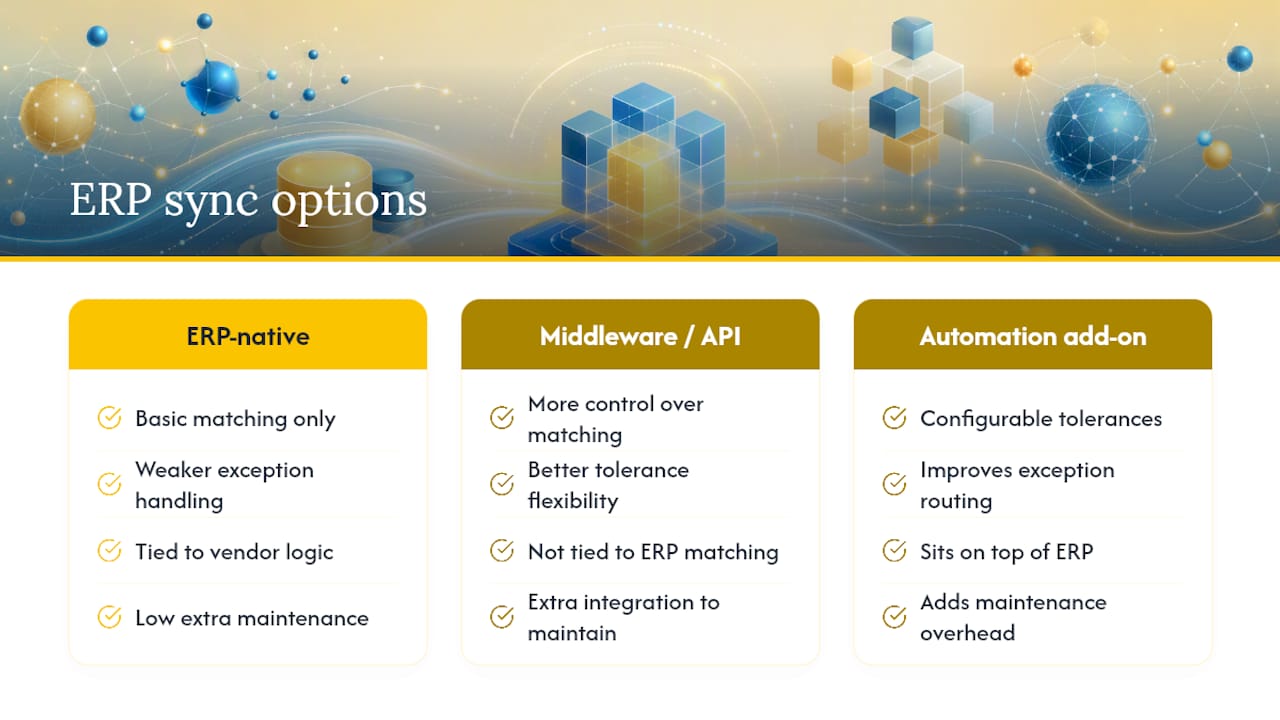
Once a match clears, the invoice needs to post into the ERP, and how that connection is built matters more than most implementation plans acknowledge. Direct native integrations are tightest but tie you to whatever matching logic your ERP vendor built in, which is often weaker on exception handling and tolerance flexibility than a dedicated layer. ERP-native matching often handles the basic comparison but falls short on configurable tolerances and exception routing, which is why many finance teams add automation on top of the ERP rather than relying on what shipped with it. Middleware and API-based sync give you more control over matching logic at the cost of an extra integration to maintain.
When an invoice doesn’t clear, the exception needs a clear owner from the moment it’s flagged. Best practice assigns ownership by exception type: procurement handles price discrepancies, receiving handles quantity discrepancies, and the original requisitioner handles a missing PO. Every exception needs a full audit trail, meaning the system logs who reviewed it, what they changed, and when it was released for payment. Without that ownership structure, exceptions pile up into a backlog that nobody feels responsible for clearing, which defeats the entire purpose of automating the clean invoices in the first place.
No automated matching system eliminates the need for human judgment entirely. AccountingTools notes plainly that even a well-configured automated match will still surface transactions requiring manual investigation. The goal isn’t zero exceptions. It’s making sure the 70 to 80 percent that are genuinely clean never touch a human, so the people on your team spend their time on the invoices that actually need judgment.
Common Exceptions and How to Resolve Them Fast
Every 3-way match program generates a predictable set of exception types. Knowing the pattern before you go live means your team isn’t improvising a triage process on day one.
-
Missing PO. The invoice references a PO number that doesn’t exist in the system, or no PO was created at all. Check the requisitioner first. This is almost always a case of someone ordering outside the approved process, and the fix is a conversation about PO discipline, not a system tweak.
-
Partial receipt mismatch. The invoice bills for the full order but the GRN only shows a partial delivery. Check the receiving log and confirm whether the rest of the shipment is still in transit. Automation that supports partial receipt tracking should hold the invoice until the remaining goods arrive rather than kicking it out as a flat mismatch.
-
Quantity or price variance outside tolerance. The invoice quantity or unit price doesn’t match the PO within your configured threshold. Check whether the vendor renegotiated pricing after the PO was cut, which happens more than most teams admit, and route to procurement to confirm.
-
Multi-PO invoices. One invoice covers goods from several purchase orders, which breaks a matching engine that expects a one-to-one relationship. A system with auto-split capability can divide the invoice across the relevant POs automatically instead of forcing a manual breakdown.
-
Vendor-entity mismatches. The invoice comes from a subsidiary or a slightly different legal entity name than what’s on the PO. This is a vendor master data problem, and automated vendor reconciliation that matches against known aliases prevents it from generating a false exception every time that supplier bills you.
Automation features like auto-splitting multi-PO invoices, flagging vendor aliases against a reconciled master list, and auto-requesting a missing GRN from receiving all cut down the manual legwork on these categories. None of them eliminate the exception. They just shrink the time someone spends figuring out what to do about it.
Implementation Checklist: Piloting and Scaling 3-Way Match Automation
Rolling out automated matching in one big push across every vendor and category is how most implementations stall. A staged approach, tested with a narrow pilot before expanding, consistently produces better long-term outcomes than trying to automate everything at once.
-
Fix your data before you automate anything. Enforce a strict “no PO, no pay” policy so invoices without a purchase order stop reaching AP in the first place. Clean up vendor master data so duplicate or outdated vendor records don’t generate false mismatches. Train your receiving team to post GRNs the same day goods arrive, since a delayed GRN is one of the most common causes of a false exception.
-
Run a narrow pilot. Pick a handful of high-volume, well-behaved vendors and a single purchase category. Set conservative initial tolerances, and define your success threshold in advance, whether that’s a target touchless rate or a maximum average resolution time.
-
Build the ownership matrix before you need it. Decide now who owns each exception type, what the SLA is for first response, and how escalations work if an exception sits unresolved past that window. Review tolerance thresholds quarterly against actual exception data rather than setting them once and forgetting them.
-
Scale deliberately. Expand to vendor-specific tolerances once you have enough transaction history to justify tightening or loosening thresholds by supplier. Build a defined path for non-PO invoices, since these will always exist for utilities, and one-off purchases. Keep monitoring dashboards visible to the whole AP team, not just the manager, so exception trends get caught early.
Pro Tip: Resist the urge to set tight tolerances from day one. Start slightly loose, watch what the exception queue actually surfaces for a few weeks, then tighten. A too-strict tolerance out of the gate just floods your team with false positives and kills confidence in the system before it’s had a chance to prove itself.
Choosing the Right Technology for Email-Heavy Invoice Workflows
Not every AP automation platform is built for how invoices actually arrive at most companies: as email attachments, forwarded PDFs, and the occasional scanned image from a supplier who still uses a fax-to-email service. If that’s your reality, the technical evaluation criteria shift.
The non-negotiables are template-free AI extraction that reads free-text emails and varied PDF layouts without per-vendor setup, ERP connectors that don’t require a middleware project just to sync matched invoices, configurable line-level matching, and tolerance rules flexible enough to differ by vendor or category. Exception orchestration matters just as much as the matching logic itself. A system that flags a mismatch but doesn’t route it anywhere useful just moves the bottleneck instead of removing it.
-
Confirm the platform handles scanned attachments and low-quality PDFs, not just clean digital invoices.
-
Ask how much setup time is required per new supplier before their invoices process correctly.
-
Check whether tolerance rules can be set at the vendor or category level, not just globally.
-
Look for built-in monitoring and alerting so a stalled exception queue gets flagged before it becomes a backlog.
Integration model matters as much as feature list. ERP-native tools are fast to deploy but often weak on exception flexibility. Middleware gives more control at the cost of another system to maintain. Email-to-ERP ingestion tools sit closest to where the invoice actually originates, which reduces the lag between receipt and processing but requires trusting the extraction layer to handle messy, unstructured input reliably.
| Integration model | Speed to deploy | Exception flexibility | Best fit |
|---|---|---|---|
| ERP-native matching | Fast | Limited | Simple, low-volume, standardized invoice flows |
| Middleware/API layer | Moderate | High | Complex multi-ERP environments needing custom logic |
| Email-to-ERP ingestion | Fast | High | Email-heavy suppliers, mixed document formats, no portal adoption |
How 3-Way Match Automation Changes Supplier Relationships and Payment Cycles
Faster, more consistent matching shortens the gap between invoice receipt and payment approval, and suppliers notice that gap closing before your own team does. A supplier who used to wait three weeks for a manually reviewed invoice to clear starts getting paid within days once clean invoices route straight through. That consistency matters more to most vendors than the actual payment date, since it lets their own cash flow planning stop guessing.
The relationship effect runs in both directions, though. Automation also makes it obvious, fast, which suppliers routinely submit invoices with mismatched quantities, wrong PO references, or pricing that doesn’t match what was negotiated. That visibility gives procurement leverage in vendor conversations that used to be buried in a pile of unresolved AP tickets nobody had time to analyze.
Early payment discount capture improves too. When an invoice clears in hours instead of weeks, it becomes realistic to actually hit a 2/10 net 30 window instead of missing it because the invoice was still sitting in a manual review queue on day nine. That’s real cash on the table that most manual AP processes leave unclaimed simply because the matching took too long to act on the discount in time.
Security and Compliance Considerations for Automated Matching
Automated 3-way matching touches financial data and vendor banking details, so it inherits the same security obligations as any other financial system, not a lighter version of them. Every match decision, tolerance override, and manual approval needs to be logged with a timestamp and a named user, both for internal audit purposes and to satisfy an external auditor asking for a sample trail during year-end review.
Role-based access controls matter as much as the matching logic itself. The person who can approve a tolerance override shouldn’t be the same person who can edit vendor banking details, since that combination is exactly the kind of control gap fraud schemes are built to exploit. Segregation of duties between requisitioning, receiving, and invoice approval needs to hold inside the automated workflow the same way it would in a manual one. Automating a broken control structure just makes the resulting fraud faster, not less likely.
Data residency and retention rules depend on your industry and jurisdiction, so confirm where a cloud-based matching platform stores invoice data and how long it retains records before you sign a contract. Any platform handling invoice and vendor payment data should be able to speak clearly to its own security certifications and data handling practices. If a vendor can’t answer that plainly, that’s worth treating as a signal on its own.
Connecting 3-Way Matching to the Rest of Your Financial Stack
Three-way matching doesn’t operate in isolation. It’s one stage inside a broader accounts payable automation pipeline, and the strength of that connection determines whether automation actually saves time or just moves the bottleneck somewhere else.
Vendor master data is the clearest example. If your vendor management system isn’t kept clean, matching engines will keep generating false exceptions from entity-name mismatches and outdated banking details, no matter how good the matching logic itself is. The fix isn’t a better matching engine. It’s tighter integration between vendor onboarding and the matching system, so a new supplier’s data is validated before their first invoice ever arrives.
Payment processing is the natural next link. Once an invoice clears the match, it needs to flow into a payment run without someone re-keying it into a separate payment system, since that’s exactly the kind of manual step 3-way matching automation was supposed to eliminate in the first place. The same logic applies to budget and spend management tools that track PO commitments against departmental budgets. If those systems don’t talk to your matching engine, you lose the ability to catch a runaway spend pattern until it’s already been paid.
Publisher Perspective: Where AP Automation Is Actually Headed
The shift worth watching isn’t more OCR accuracy. It’s the move from rigid, template-based extraction to AI that reads a free-text email the way a person would, no pre-built layout required. That change matters most for teams whose suppliers invoice through inboxes rather than portals, which is still most of the B2B world.
What that shift does to the AP role is more interesting than the technology itself. As clean invoices stop needing a human, the job stops being data entry and becomes exception ownership and process design, deciding tolerance rules, chasing down the vendor whose invoices always mismatch, and improving the receiving process that’s generating false exceptions. Teams that treat automation as a chance to redesign those policies get more value than teams that just bolt automation onto an unchanged process. For suppliers who invoice primarily by email, that email-native extraction layer, rather than a portal they’ll never adopt, is usually the fastest realistic path to a working touchless rate.
— Evert
Ampwise: Built for AP Teams Drowning in Email
Ampwise turns your Outlook or Gmail inbox into the front door of your ERP instead of a bottleneck feeding it. It reads orders, invoices, PO confirmations, and goods-receipt emails directly from your inbox, whether they arrive as a clean PDF, a scanned attachment, or a plain-text message with no structure at all, and pushes verified data into your existing ERP with no per-vendor template to build or maintain.

That template-free extraction cuts manual data entry by up to 90 percent, according to Ampwise’s own reported figures, which matters most if your invoice volume comes from dozens of suppliers who will never standardize their formats no matter how many times you ask. Ampwise fits companies and teams still doing manual email-to-ERP entry today. If that’s your workflow, the Directo webinar walks through the product in action, or you can learn more about the platform and see whether it fits your current ERP setup.
Sources
FAQ
What Is a 3-Way Matching Process?
A 3-way matching process compares the purchase order, goods receipt, and supplier invoice before payment is approved. When the three align within tolerance, the invoice posts automatically; when they don’t, it’s flagged for manual review.
What Documents Are Needed for a 3-Way Match?
You need the purchase order, the goods receipt note (GRN) confirming what physically arrived, and the supplier invoice requesting payment. Some organizations add a fourth document, an inspection or quality report, which turns the process into 4-way matching for high-value or regulated purchases.
What Are Common 3-Way Matching Errors?
The most frequent exceptions are missing PO references, partial receipts that don’t yet match the full invoiced quantity, price or quantity variances outside tolerance, invoices spanning multiple purchase orders, and vendor-entity name mismatches. Most of these trace back to receiving delays or loose PO enforcement rather than the matching logic itself.
How Do You Implement 3-Way Matching in Accounts Payable?
Start by enforcing PO discipline and cleaning up vendor master data, then pilot automation with a small group of high-volume vendors before setting tolerance thresholds. A staged rollout, pilot first, then scale, produces more reliable long-term results than automating every vendor at once.
How Much Does 3-Way Match Automation Cost With Ampwise?
Ampwise’s current pricing is available directly on its site rather than published as a fixed rate. Companies with heavy email-based invoice and order volume can check current details and see how the platform fits their existing ERP.