
From Email to ERP Order Faster: Cut Manual Work with AI
Webinar recap: how to use Claude Cowork and Ampwise AI to turn customer emails, PDFs and Excel files into Directo sales and purchase orders — with a Morek case study.

· Evert Eero, Founder of Ampwise
TL;DR
- What: Recap of the April 23, 2026 Ampwise AI webinar (300+ registrations) on cutting manual work in sales and purchasing.
- Tools covered: Claude Cowork (AI assistant inside Excel, Word, Microsoft 365, HubSpot, Jira, Slack, Teams and the browser) and Ampwise AI (email → ERP order automation for Directo and others).
- Use cases: classifying customer lists, quarterly cost reports from multiple Excels, creating Directo sales orders from email attachments, automating order confirmations, posting incoming goods.
- Customer proof: Morek runs Ampwise AI in production today.
- Takeaway: pick one repetitive process, automate it this quarter, and stop letting competitors get ahead.
We all want more time. More time for the things we enjoy, less for the boring, repetitive, time-consuming work — copying data between systems, entering invoices, hunting for a delivery date in a PDF, checking that invoice lines match what was ordered, or typing a customer's order into the ERP by hand.
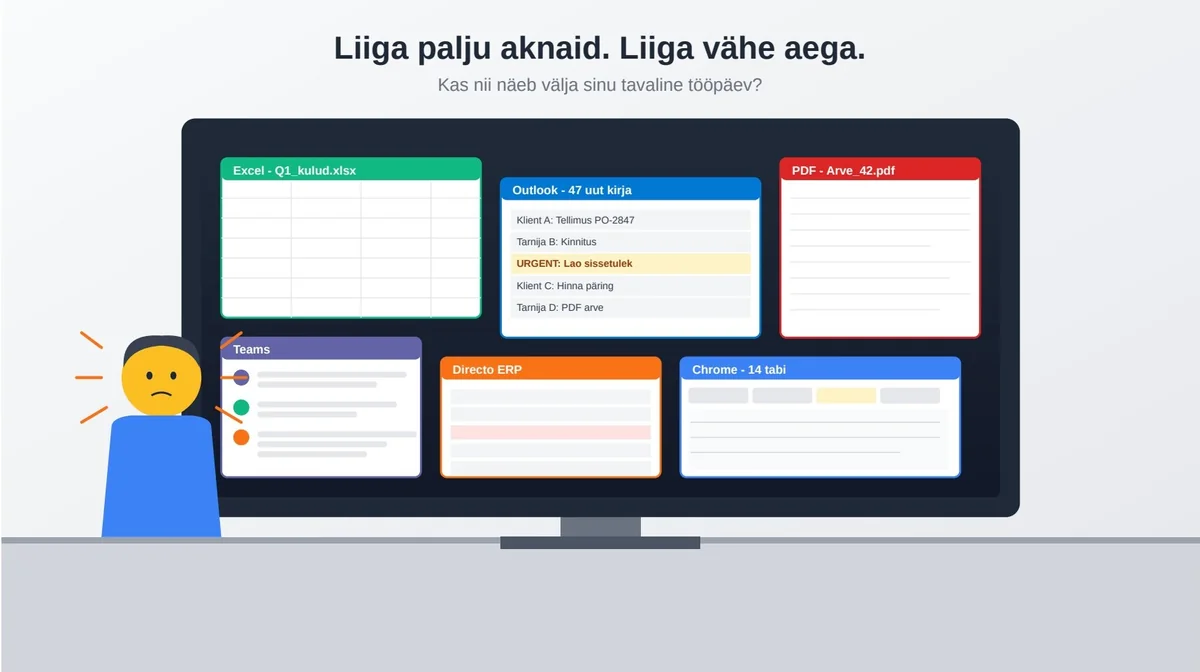
The webinar focused on practical tools and examples of bringing AI agents into real day-to-day work. We covered Claude Cowork and Ampwise AI.
Why act now?
Studies show people who use AI earn on average 28% more than those who don't. Employers increasingly look for people who know how to use AI tools. That's an edge — not just because you work faster, but because you can take on tasks you've never been formally trained for.
Part 1: What is Claude Cowork?
You've probably heard of ChatGPT. Maybe Gemini or Grok too. There are dozens of AI tools today. In the webinar we focused on Claude.
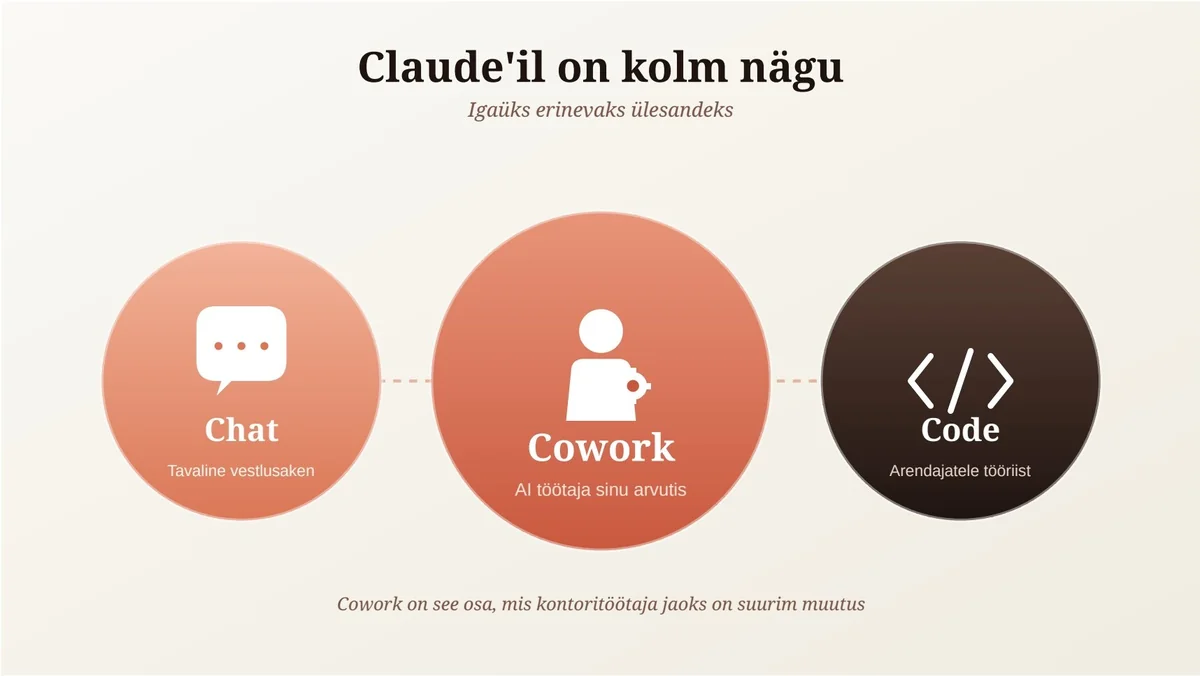
Claude has three main "faces":
- Chat — the chat window, similar to ChatGPT.
- Cowork — an AI worker that lives on your computer and can talk to your applications.
- Code — a tool for developers to build and modify code.
For office workers, Cowork is the biggest shift. It's no longer just a chatbot — it's an AI assistant that works inside your apps and helps you do real work. Cowork runs directly in Excel, Word and PowerPoint. Open a file, ask it to change something, and it does it in front of you.
How does Claude connect to your tools?
Cowork connects to many platforms: Microsoft 365, HubSpot, Jira, Slack, Teams, and others. For more obscure software without a direct integration, you can use the Chrome extension. Claude can operate in the browser like a human: clicks, scrolls, fills in forms, navigates between views. Slower and more expensive than a direct connection, but indispensable in some situations.
What does Cowork actually do? Six practical examples
1. Analyzing a customer list in a minute
340 people registered for the webinar. I wanted to know who they were, which companies they came from, and what industries they worked in. Done by hand, this would take half a day. I told Cowork:
"Take this CSV file. Classify the companies. Look up revenue from the business registry. Identify gender. Build a chart. Give me recommendations."
My time: one minute. Claude's time: five. The result was a complete report — plus a PowerPoint slide it built itself, plus recommendations on whom to contact first.
2. A quarterly cost report from multiple Excels
I had three IT cost Excels with slightly different structures. Normally: open all three, copy data together, normalize columns, build a pivot, draw a chart. I asked Cowork to summarize Q1 costs. It asked clarifying questions, then I went further: "Give me recommendations on how to cut costs."
- too much development was outsourced;
- the software license list needs review;
- some recurring costs should be renegotiated.
Lesson: ask the AI to do more than you normally would. Don't only ask for a summary — ask for conclusions, risks, and recommendations.
3. Cleaning up the Downloads folder
My Downloads folder was a mess. I gave Cowork access and asked it to organize files by type, delete duplicates, and leave files I hadn't used in a long time alone. A safety note: don't give the AI access to your whole computer right away. Start with a separate test folder.
4. Stocklists from Directo for customers
One of our customers regularly emails an Excel stocklist to their clients. Different prices for different customers. Cowork opened Directo in Chrome, logged in, found the right report, exported the CSV, formatted the Excel and saved it to OneDrive. Same result. Far less manual work.
5. A summary of conversations with one colleague
Meetings, emails, Teams messages — everything is scattered. You can tell Cowork: "Pull together everything I've discussed with Eliis over the past month from Outlook and Teams." The result is one view with agreements, deadlines, and open items.
6. Automatic meeting summaries
Drop your phone on the table, open the app, record the meeting. You get a transcript, a summary and concrete tasks: who needs to do what. These tools handle Estonian, Latvian and Lithuanian quite well.
Part 2: Ampwise AI and the end of tedious work
So far we've talked about general AI tools. But what if you run a company that gets 50 sales inquiries, 30 order confirmations and 20 PDF invoices a day, all of which have to land in Directo? That's where Ampwise comes in.
How Ampwise was born
We were a trading company ourselves. We wanted to grow. The only obvious option was hiring more people. Then we looked at AI and asked: could it cut down the boring work? Specifically: could we get email content into Directo without anyone retyping it? We built a solution, used it ourselves for two years, it worked — and turned it into a separate product.
What we don't do
One thing has to be clear up front: we do not let AI run free inside Directo. Ever. The AI extracts products and content from email. Full stop. Everything else moves through the standard XML API used by Directo — algorithmic, controlled, predictable. Why? Because AI can hallucinate. We've placed it inside a strict "black box" where it can operate safely.
Sales side: inquiries and orders
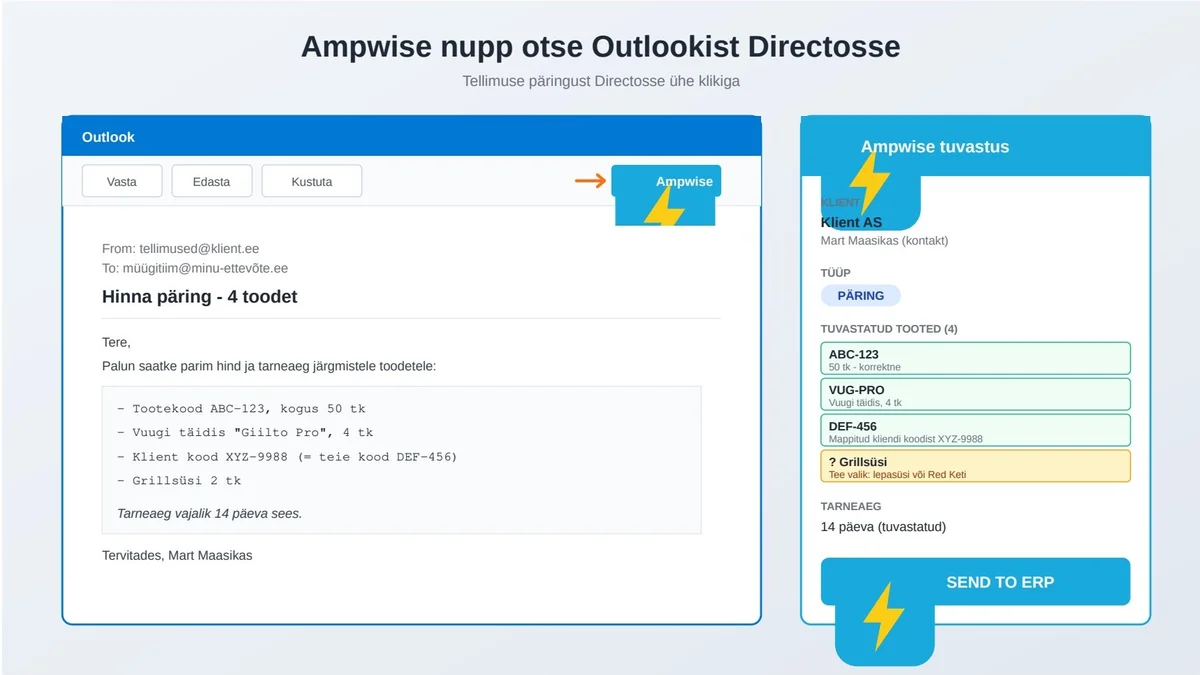
You have Outlook open. The first thing you notice is that our app has classified the emails:
- this is an inquiry;
- this is an order;
- this is just a conversation;
- this email needs review;
- this email is already in Directo.
A customer sends an inquiry for four products. You click the Ampwise button in Outlook. A panel opens showing the customer (matched by email domain), the contact person, the inquiry type, and all four products mapped to Directo SKUs. You review, click "Send to ERP", and a quote appears in Directo seconds later. One click. Work that used to take ten minutes.
What if the customer doesn't use your SKUs? The AI also recognizes your supplier codes, descriptions and custom fields. If a customer asks for something ambiguous like "grilling charcoal", you can pick alder vs. another type — and teach the system: "For this customer, grilling charcoal always means alder." Next time, it knows.
Same with PDFs. Excel? No problem. Multiple PDFs in one email? No problem. PDF that's actually an image? Also fine.
Purchasing side: supplier confirmations
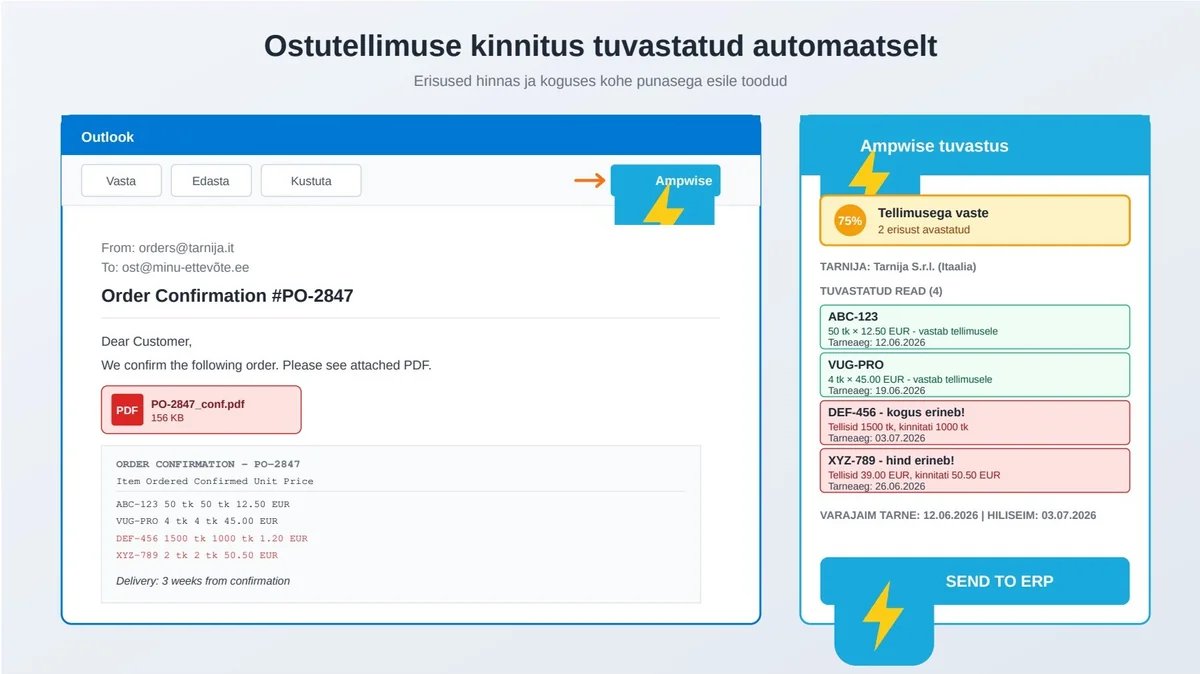
You ordered something from a supplier. They send a PDF confirmation. Our system first shows a match percentage. If it's 100%, everything matches the PO — one click and done.
But often there are differences: you ordered at €39, confirmation is €50.50; you ordered 1500 units, confirmed 1000; a line is missing or extra; the delivery date moved. All differences are highlighted. Then you decide: update your PO, or write back asking for a corrected confirmation.
Goods receipt: the biggest time saver
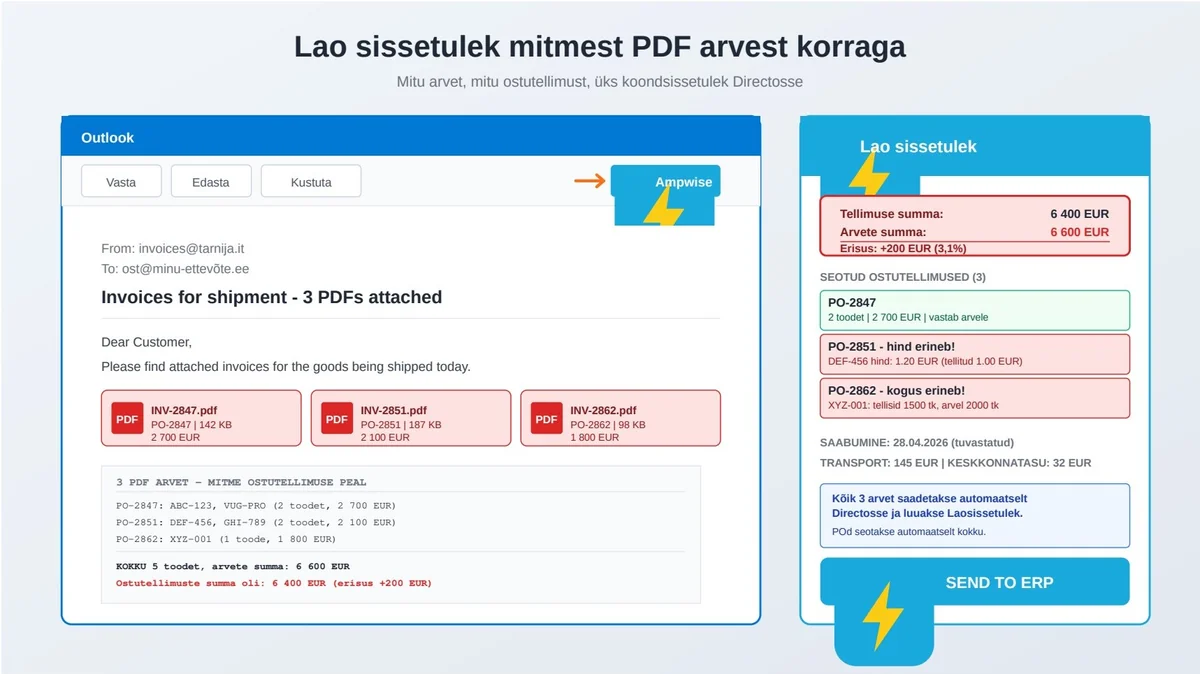
The supplier emails an invoice as PDF. With an Italian supplier, the PDF can be tricky — PO number at the bottom of the page, products named differently, units in tons instead of liters. Manually this takes 30 minutes.
Our system automatically:
- reads the invoice;
- identifies the PO number;
- classifies products;
- sums totals;
- compares against your order;
- creates the goods receipt if needed;
- attaches files in Directo.
If multiple PDFs arrive in the same email, the system creates a consolidated receipt and links every PO. Discrepancies are flagged immediately — not days later when somebody is about to pay.
A real customer: Urmet Raba from Morek

Urmet runs Morek Estonia. Morek manufactures and sells electrical materials and EV chargers. Their pain was simple: orders come in many different shapes, and every customer has their own format.
They tried building a B2B portal. Invested in it seriously — eight years. But the biggest customers said: "We have 200 suppliers and each has a portal. We send PDFs by email. Our ERP generates them anyway."
Instead of forcing customers into their format, they decided to let customers send orders however they wanted. The problem isn't the customer's — it's the company's: how to get the data into the ERP. Ampwise was ready exactly then. Urmet's verdict: "Bullseye. Solved exactly that problem."
Today:
- one fewer person needed in back-office;
- nobody had to be let go — they simply didn't replace someone who left;
- existing people do smarter work;
- complex orders that used to take a morning for four are now four per hour;
- roughly 60-70% time savings.
Part 3: Where to start?
You probably have two thoughts now. First: interesting. Second: where do I begin? Start simple.
What can you do tonight at home?
- Get Claude. Go to claude.ai and sign up. Pricing starts around €20/month.
- Install the Cowork desktop app. Browser is fine to start, but the real power is in the desktop app.
- Pick one annoying task. Not ten. One. A calendar summary, cleaning up an Excel, organizing Downloads.
- Talk to it like a person. Plain language works.
- See what happens. If it nails it — great. If it gets it wrong, tell it and correct.
For safety, don't grant access to your whole computer right away. Make a folder called "Claude" on your desktop and start there.
What to do at the company?
- Find where the most tedious manual work happens.
- Choose the first target by what frustrates people the most.
- Gather a few concrete examples — how much time, how many errors.
- Run a pilot: one department, one month, measurable result.
- Train the team. AI doesn't take work away — it removes the boring part.
If you use Directo
Setup typically takes a week. We start by reviewing your data. Digitalization grants are also available — our partner Digiwise helps with applications and paperwork.
Conclusion: a simple truth
AI isn't from the future. It's already here. It works. Companies using it today get significantly more done in the same amount of time.
You don't need to flip your business upside down. You don't need to hire AI experts. You just need to pick one tedious process that frustrates you or your team most, and try.
People who try usually end up thinking the same thing: "Why didn't I do this earlier?"
The bad news: if you wait six more months, some competitors will already be ahead. The good news: you're not late. Just don't wait until tomorrow. See you soon!
Frequently asked questions
What is Claude Cowork and how is it different from ChatGPT?
Claude Cowork is an AI worker that runs on your computer and operates inside your apps — Excel, Word, PowerPoint, Microsoft 365, HubSpot, Jira, Slack, Teams and the browser via a Chrome extension. Unlike a chat window, it can click, fill in forms and complete real tasks for you.
How does Ampwise AI turn an email into a Directo sales or purchase order?
Ampwise AI reads incoming customer or supplier emails (including PDF and Excel attachments), extracts the order lines, matches them to your product catalogue and creates the sales or purchase order directly in Directo or your ERP — no manual copy-paste.
Do I need developers or an IT project to start?
No. You can start with a single tedious process — for example order confirmations or incoming goods — and Ampwise handles the integration. Most customers go live in days, not months.
Where can I watch the full webinar and download the slides?
The full recording is embedded at the top of this post, and the slide deck is available as a PDF download right below the video.