
Email Intent Classification: How It Works and How to Use It

Email intent classification is the step where software reads an incoming message and decides what the sender wants: place an order, ask for a quote, confirm a purchase order, chase an invoice. It is different from spam filtering, which only asks whether a message is wanted. For wholesale, manufacturing and purchasing teams, intent is what decides where an email goes next, and a correct label is the first step toward getting the data into your ERP without anyone retyping it. That is the problem Ampwise AI is built around: reading orders, inquiries, invoices and PO confirmations in Outlook or Gmail and moving verified data into your ERP.
TL;DR
- Intent classification labels each email by what the sender wants, so it can be routed, answered or turned into an ERP record.
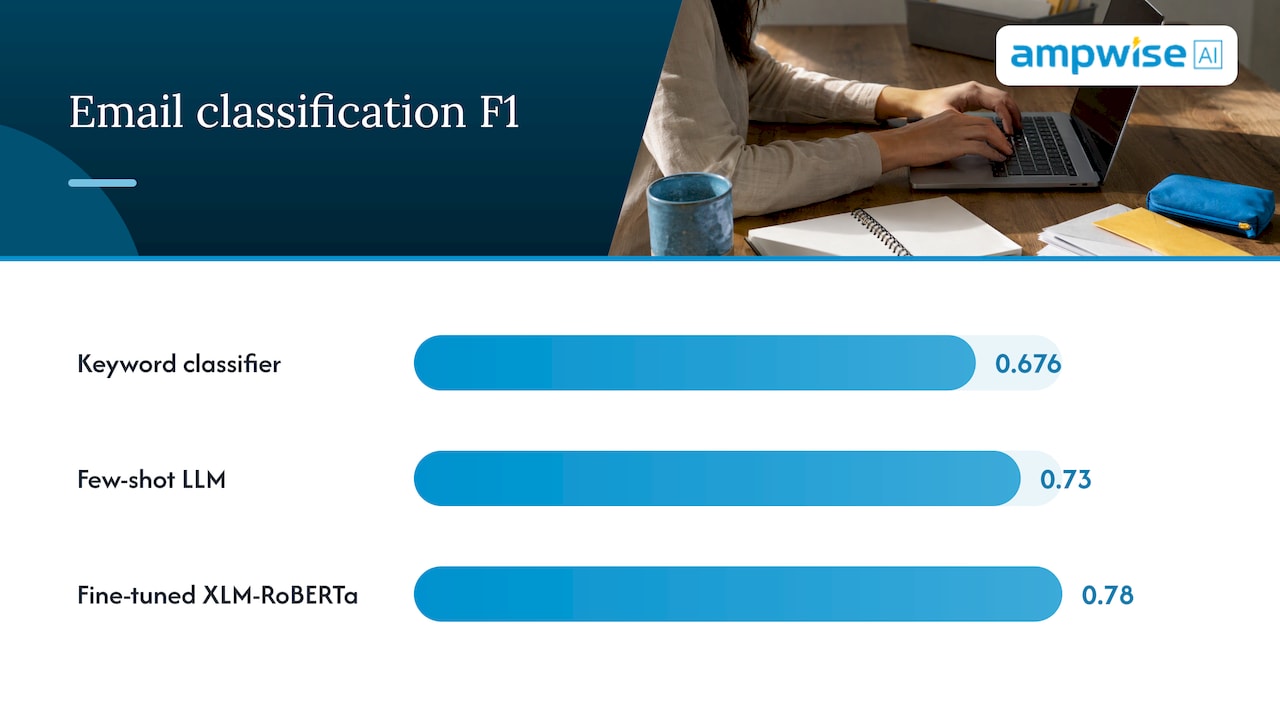
- Modern classifiers range from keyword rules to fine-tuned language models. In a published production study, a fine-tuned encoder reached an F1 score of 0.78, against 0.676 for keywords.
- A small, well-chosen label set and a review step for uncertain emails matter more than the model brand.
- For order-to-cash and procure-to-pay mail, the intent label should lead straight to extraction and one-click approval, not stop at a folder.
Table of Contents
- What email intent classification actually identifies
- How AI decides what an email means
- How accurate can you expect it to be?
- One label or several?
- How much labeled data do you need?
- Putting intent to work: from label to ERP record
- A short checklist before you start
- Our perspective
- See it on your own inbox
- FAQ
- Sources
What email intent classification actually identifies
Spam filters and priority inboxes sort by sender reputation or general topic. Intent classification goes further and asks what action the message calls for. A Microsoft Research study of enterprise email described four broad intent families: information exchange, task management, scheduling and planning, and social communication. The same paper found that a model does better when it reads each sentence together with the whole message and its metadata, instead of judging a sentence alone.
That finding matters in a B2B inbox. “Please confirm” can mean a delivery date, a price or a quantity. The surrounding message, the attachment and the thread history tell you which.
Intent labels that fit a B2B operations inbox
Generic intent families are a starting point. An operations team usually needs labels tied to the next action. A practical set looks like this:
| Intent | What the sender wants | Typical next step |
|---|---|---|
| New order | Goods or services purchased | Extract lines, validate, create sales order |
| Order change | Quantity, date or address amended | Match to the open order, update |
| Request for quote or inquiry | Price, availability, technical answer | Route to sales, draft a response |
| PO confirmation | Supplier acknowledges your purchase order | Compare to the PO, flag deviations |
| Invoice | Payment request | Extract header and lines, match to PO or receipt |
| Delivery or incoming goods notice | Shipment or advance notice | Update the expected receipt |
| Other or unclear | Anything else | Human review |
The last row is not an afterthought. A class for “unclear” keeps the system from forcing a bad guess into your ERP.
How AI decides what an email means
There are three common approaches, and they trade effort against accuracy.
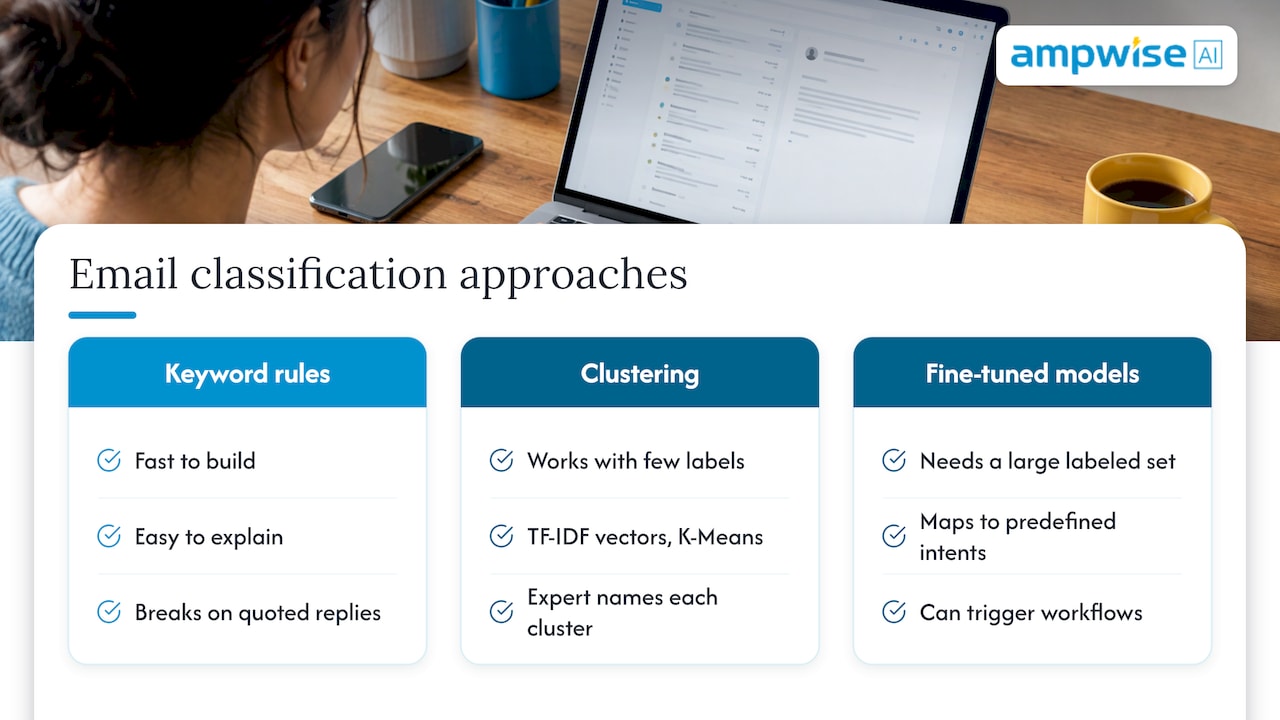
Keyword and rule matching. Look for words such as “order” or “invoice”. It is fast to build and easy to explain, but it breaks on quoted reply text and on free-text phrasing.
Clustering with expert labels. When you have few labeled examples, one published pipeline standardizes the emails, extracts features such as verbs and specific nouns, builds TF-IDF vectors, clusters them with K-Means and asks a subject-matter expert to name each cluster. TF-IDF simply scores words by how distinctive they are for a message.
Fine-tuned language models. With a large labeled set, the same pipeline fine-tunes a pre-trained language model so it maps each email to a predefined intent. After the intent is recognized and key details are extracted, the system can reply from a template, move the email to a folder, forward it or start a database workflow.
Large language models, few-shot or fine-tuned
A general LLM can classify with a handful of examples in the prompt, which is attractive when you have no labeled history. A production study on live traffic from a platform with more than 1,300 accounts in 17 languages compared the options. A keyword classifier scored an F1 of 0.676, an LLM with few-shot examples reached 0.73, and a fine-tuned XLM-RoBERTa encoder trained on 11,000 operator decisions reached 0.78, with nearly half the false positives. F1 is a single score that balances how many correct labels the model finds against how many of its labels are right.
The lesson for a business: your own corrections are valuable training data. Once your team has decided on thousands of emails, a model tuned on those decisions learns your operating rules, not a generic idea of intent.
How accurate can you expect it to be?
Accuracy depends on the task, the number of classes and the cleanliness of the text. Two academic data points give a realistic range:
- A KTH Royal Institute of Technology thesis built a customer-support prototype with open-source LLMs and reached 0.89 accuracy for intent identification across 859 real-world emails and 0.92 for data extraction.
- On a harder, noisier task in the production study above, the best model reached an F1 of 0.78.
The gap between those numbers tells you something. A small set of clearly different intents, such as order versus invoice, is easier than judging whether a reply is worth answering. Define your classes so they are visibly different from each other, and expect the model to do best there.
What causes misclassification
The same production study found that 96% of replies contained quoted text, which is why a naive keyword classifier performed no better than a baseline that answered everything. In an order inbox the equivalents are:
- Long reply chains where the new request sits above three older messages.
- Emails with two intents, for example a confirmation plus a new inquiry.
- Attachments that carry the real content while the body says only “see attached”.
- Scanned PDFs and photos of documents with no clean text.
The fixes are practical: classify using the body and the attachment together, allow more than one label per email, and treat low-confidence results as a review queue.
One label or several?
Single-label classification assigns exactly one intent. It suits inboxes where each message does one job. Multi-label classification lets an email carry several intents, which fits a message that confirms a PO and also asks for a new quote. Research on customer contact intents found that moving from one multiclass model to a setup with a separate yes-or-no task for each class, plus one multiclass task, raised average AUC-ROC by almost 20 points over a plain fine-tuned baseline. For a purchasing team the takeaway is simple: allow an email to hold more than one intent, and split it into separate actions.
How much labeled data do you need?
Less than most teams fear. A study on sales emails found that fine-tuning a BERT model outperformed feature-based approaches from about 300 labeled samples and reached an F1 of 0.8214 with 500. Below 300 it fell behind.
A 2026 Hamburg University of Applied Sciences thesis looked at how to choose which emails to label. On about 2,300 customer-request emails across 10 uneven classes, contrastive active learning found all 10 classes with about 520 labeled emails, versus about 1,260 with random sampling. In plain terms: let the system ask you to label the emails it is least sure about, instead of labeling a random pile.
The same thesis argues that intent lists change as new request types appear. Do not wait for a perfect taxonomy. Start with the classes you handle daily, send everything else to an “other” bucket, and promote a new class once you have collected a few examples of it.
Putting intent to work: from label to ERP record
A label on its own saves little. The value comes when it triggers the next step. A workable flow in an email-heavy B2B team:
- Read the whole message. Body, attachments (PDF, Excel, scans) and thread context.
- Classify the intent and attach metadata such as customer, document number and urgency.
- Route. Orders to order entry, inquiries to technical sales, invoices to accounts payable.
- Extract and validate. Pull the lines, check them against master data and open documents.
- Approve. A person confirms what the system verified, and the record goes to the ERP.
- Feed corrections back. Every override becomes training signal.
On step 6, the e-commerce team behind the multi-task study notes that asking agents to assign the right intent to every misclassified case is prohibitively expensive, so they used simple rejections as hard negative examples. Their design extracts learning from a plain “no” without full relabeling. The same idea works for you: a one-click reject is enough to improve the next round.
The ACL 2025 authors of the pipeline above also chose template-based replies over free LLM generation for enterprise actions, citing lower predictability and higher cost of generated text. For order confirmations and routine acknowledgments, fixed templates grounded in your business rules are a sensible default. For a closer look at how routing and automated responses connect, see this guide on customer engagement automation and this overview of AI in email workflows.
Where we take this further
Intent is only the first half of the job. Once an email is recognized as an order or a PO confirmation, the data has to land in the ERP correctly. We cover that path in our guides on how email-to-ERP automation works, auto-routing order emails and parsing PDFs from email. If inquiries are your bottleneck, inquiry response automation shows how the same intent step speeds up replies.
A short checklist before you start
- Write down five to eight intents tied to actions, plus “other”.
- Pull 300 to 500 real emails, including scans and messy threads, and label them.
- Decide which intents may go straight to a draft and which always need a person.
- Measure on your own mail, not on a vendor’s demo set. Track precision (how many labels are right) and recall (how many true cases are caught) per intent.
- Review a sample of corrections weekly in the first months.
Our perspective
Most teams we talk to do not have an intent problem in the abstract. They have an inbox where an order, a price question and a delayed-shipment notice look alike until a person opens the PDF.
Our view is that classification should never be a separate project from data entry. If the label does not lead directly to extracted, validated data and a one-click approval into the ERP, the team still retypes everything and the label only decorates the folder.
That is why Ampwise works directly in Outlook and Gmail, needs no templates and handles emails, PDFs, Excel files and scanned documents in one flow. Your people keep working the way they do, and the repetitive typing goes away. Our aim is to reduce manual data entry by up to 90%.
Start with the mail that costs you the most hours, prove it on a few weeks of real traffic, and widen from there.
Evert
See it on your own inbox
Ampwise AI automates the extraction, validation and direct entry of orders, inquiries, invoices, PO confirmations and incoming goods from Outlook and Gmail into your ERP, with smart email labeling, status tracking and metadata extraction. Verified data goes into the ERP with one click. You can see the full offer on the Ampwise AI page.
If you want to plan a rollout first, our article on a 2 to 4 week inbox-to-ERP pilot lays out how to begin small.
FAQ
What is the difference between email classification and intent classification?
Email classification sorts messages by category or topic, such as spam, newsletters or invoices. Intent classification asks what the sender wants done. Two emails can share a topic and carry different intents, for example a question about an order and a request to change it.
Which algorithm should I use?
The right one depends on how many labeled emails you have. With very few, clustering plus expert labels or few-shot prompting gets you started. With a few hundred labeled examples, a fine-tuned language model beat feature-based methods in a sales-email study. With thousands of your own decisions, a model tuned on them can outperform a general LLM.
How do I handle emails the classifier is unsure about?
Set a confidence threshold and send everything below it to a person. Keep an “other” class for unfamiliar requests, and record each correction so the model learns from it. Reviewing a sample each week keeps quality steady as your request types change.
Can one email have more than one intent?
Yes, and in B2B mail it is common. A supplier may confirm a PO line and ask about a new quote in the same message. Use multi-label classification and split the email into separate actions, one for the PO check and one for the sales team.
Sources
- Context-Aware Intent Identification in Email Conversations (Microsoft Research, SIGIR 2019)
- Advanced Messaging Platform (AMP): Pipeline for Automated Email Handling (ACL 2025 Industry)
- LLM-Based Intent Classification in Corporate Email (International Journal of Open Information Technologies)
- Developing a Prototype for Customer Support Automation (KTH Royal Institute of Technology, 2024)
- A Semi-supervised Multi-task Learning Approach for Customer Contact Intents (arXiv 2106.07381)
- An Evaluation of Transfer Learning for Classifying Sales Engagement Emails (arXiv 1905.01971)
- Label-Efficient Email Classification and Sequential Class Discovery (Hamburg University of Applied Sciences, 2026)
- Customer Engagement Automation: A Guide for Local Businesses
- AI in Email: How It Is Used and What It Does to Deliverability