
From 4 Days to 4 Hours: Intelligent Document Processing for Ops Teams

Intelligent document processing turns invoices, emails, and contracts into validated, workflow-ready data so businesses can automate decisions instead of retyping them. It combines optical character recognition, natural language processing, and machine learning to read a document, understand what it means, and hand off clean data to the systems that run your business. The payoff is fewer manual touches, faster cycle times, and data your ERP or CRM can trust without a human re-checking every field.
TL;DR:
- Most implementations require defining clear baseline metrics such as processing time, exception rates, and straight-through processing rates before expanding scope.
- High-volume, structured, and repeatable document workflows in finance, healthcare, insurance, legal, HR, and logistics benefit most from IDP, especially when processing thousands of documents monthly.
- Effective IDP deployment depends on choosing a single process, collecting representative samples, setting validation rules, and establishing governance from the start to prevent scope creep and failure.
- Trust in extracted data must be supported by validation checks, quality assurance, and ongoing model monitoring to avoid errors that silently impact downstream decisions.
- Vendors should be evaluated on integration capabilities, output transparency, security standards, ease of use, and measurable pilot metrics, rather than marketing claims or demo hype.
Table of Contents
- What Is Intelligent Document Processing, Really?
- How Does IDP Actually Process a Document?
- What Business Benefits Does IDP Deliver?
- Where Does IDP Deliver the Most Value by Industry?
- How Do You Roll Out IDP Without It Stalling?
- What Goes Wrong With IDP in Production?
- What Should You Ask Vendors During Evaluation?
- Why Most IDP Pilots Underdeliver, and How to Fix That
- See How Ampwise Handles Email-to-ERP Automation
- Sources
- FAQ
What Is Intelligent Document Processing, Really?
Intelligent document processing (IDP) is a pipeline, not a single tool. It moves through five stages: capture, classification, extraction, validation, and output. Each stage solves a problem the previous generation of software couldn’t touch.
OCR, the technology most people confuse with IDP, only does one job: it converts pixels into text. That’s step one of five. Microsoft’s framing of IDP describes the full sequence as capture, classification, extraction, validation, and output, often paired with workflow and robotic process automation (RPA) for end-to-end automation. IDP adds the layers OCR never had: it figures out what kind of document it’s looking at, pulls specific fields with context (not just raw text), checks whether those fields make sense, and learns from corrections over time.
That last point is where IDP and RPA genuinely diverge. RPA executes rules on structured inputs, it clicks buttons and copies fields between screens, but it can’t read a messy PDF or a free-text email and figure out what matters. IDP handles the unstructured mess first, then RPA (or a direct API call) can act on what comes out the other side.
Three distinctions worth keeping straight:
- OCR reads characters. It has no idea if “Net 30” is a payment term or a shipping note.
- RPA automates repetitive digital tasks but needs structured data to work with.
- IDP classifies, extracts, validates, and routes unstructured documents so RPA and ERPs have something reliable to act on.
Simple digitization, scanning a paper invoice into a PDF, isn’t automation either. It’s storage. IDP is the layer that makes a scanned page usable by software.
How Does IDP Actually Process a Document?
The mechanics matter because vendors throw around terms like “AI-powered” without explaining what’s happening underneath. Here’s the real sequence, and where generative AI fits.
- Capture. Documents arrive as scanned paper, native PDFs, email bodies, or attachments buried in an inbox. A mature system pulls from all of these, not just a single upload folder.
- Classification. Before extracting anything, the system decides what it’s looking at, an invoice, a purchase order confirmation, a claim form. This relies on ML classifiers trained on document patterns, sometimes reinforced with rules or embeddings for edge cases. Get classification wrong and every downstream step inherits the error.
- Extraction. This is where OCR, NLP, computer vision, and machine learning work together to pull specific fields: vendor name, invoice total, line items, dates. Table parsing is its own hard problem here, since line items rarely sit in identical positions across vendors.
- Validation. Extracted values get checked against deterministic rules, does the invoice total match the sum of line items, does the vendor exist in your master data, and each field gets a confidence score. Low-confidence extractions route to a human review queue instead of flowing straight through.
- Learning and integration. Corrections made in the review queue feed back into the model. Output lands as structured JSON or API calls directly into ERP, accounting, or CRM systems.
Generative AI and large language models have started doing real work in that fourth and fifth stage. AWS documents how generative AI extends document processing by summarizing long contracts, resolving ambiguous fields (is “ABC Corp” the same entity as “ABC Corporation Ltd”?), and synthesizing data across multiple related documents.
Pro Tip: Ask any vendor demoing an LLM feature exactly which stage it touches, classification, field resolution, or summarization. “AI-powered” without a stage attached usually means marketing, not architecture.
What Business Benefits Does IDP Deliver?
Speed and accuracy are the headline benefits, but the metric that actually moves budget conversations is cycle time, not headcount. Businesses adopting IDP report throughput and cycle-time gains as the primary win, ahead of any story about eliminating jobs. That reframing matters for how you pitch a pilot internally: nobody wants to hear “we’re cutting staff.” Everyone wants to hear “invoices that took four days now clear in four hours.”
By the numbers: Organizations implementing IDP see faster processing and reduced error rates compared to manual and pure-digitization approaches, with throughput and cycle-time improvement cited as the leading measured benefit, not headcount reduction.
Five KPIs worth tracking from day one of any pilot:
- Processing time — hours or days from document arrival to decision.
- Straight-through processing (STP) rate — the percentage of documents that need zero human touch.
- Exception rate — how often a document routes to manual review, and why.
- Cost per document — fully loaded, including review time.
- Time-to-decision — how long it takes downstream teams to act once data lands in your system.
Picture an accounts payable team processing a high volume of invoices manually, each taking several minutes of manual entry and matching. Shifting a substantial portion of those to straight-through processing allows the team to reclaim significant time, which then goes toward managing exceptions and vendor disputes that actually need judgment. That’s the real ROI story: not fewer people, but people doing work that isn’t data entry.
Where Does IDP Deliver the Most Value by Industry?
Not every document workflow deserves a pilot. The best candidates share three traits: high volume, repetitive structure, and a clear, checkable outcome. IBM’s industry breakdown points to finance, healthcare, insurance, legal, HR, and logistics as the sectors seeing the most traction, and the pattern holds across each:
- Accounts payable (finance): invoices, PO confirmations, and packing slips feed fields like vendor name, invoice total, and line items. High-volume, standardized formats make this the classic straight-through-processing candidate.
- Insurance claims: claim forms and supporting medical or repair documentation extract policy numbers, incident details, and damage estimates. Variability in formats keeps exception rates higher than AP.
- Legal and contracts: contracts and amendments yield obligations, renewal dates, and clause language. This is exception-heavy work almost by design, since every contract negotiates something differently, which is exactly why firms exploring legal intake automation focus early effort on qualification and triage rather than full extraction.
- HR onboarding: offer letters, tax forms, and ID documents extract personal data and compliance fields, with straight-through rates rising fast once templates stabilize.
- Logistics: bills of lading and customs paperwork extract shipment details, weights, and destination codes, feeding systems that need speed more than perfection.
Volume is the signal that separates a good pilot from a wasted quarter. A process handling 50 documents a month rarely justifies the setup cost. One handling 5,000 almost always does.
How Do You Roll Out IDP Without It Stalling?
Most IDP failures aren’t technology failures. They’re scope failures, teams try to automate everything at once instead of proving value on one workflow first.
- Pick one measurable, document-heavy workflow. Establish a baseline: current volume, average processing time, and exception rate before you touch any software. SAP’s reference architecture guidance is explicit on this point, you can’t prove improvement without a documented starting line.
- Collect representative documents, including the ugly ones. Poor scans, unusual layouts, and handwritten notes belong in your sample set, not just the clean examples a vendor demo will show you.
- Define required fields and validation rules up front. What has to match? Invoice total against line items? Vendor name against your supplier master? Write the rules before you pick the tool.
- Set confidence thresholds and build a review queue that shows the original document next to the extracted values side by side. Reviewers correcting errors blind, without seeing the source, will approve mistakes they’d otherwise catch instantly.
- Measure field-level accuracy and STP rate before expanding scope. Aggregate “accuracy” numbers hide which fields are unreliable. A vendor total field that’s 98% accurate matters more than an overall score that blends it with a rarely-used memo field.
- Build governance from day one: PII redaction where documents contain personal data, an audit trail for every automated decision, role-based access to review queues, and a retraining cadence when volume or document types shift.
Pro Tip: Run your pilot for at least one full billing or reporting cycle before judging results. A two-week test will catch obvious bugs but won’t surface the seasonal document variations that cause most exception spikes.
What Goes Wrong With IDP in Production?
The hardest problem in production IDP isn’t OCR accuracy, it’s deciding whether extracted data is trustworthy enough to act on without a human looking at it. Confidence scores alone aren’t enough; you need deterministic backstops.
- Validation failures: combine confidence scores with hard checks, totals reconciliation, master-data matching, and duplicate detection, so a plausible-looking but wrong extraction still gets caught.
- Data quality: poor scans and inconsistent formats degrade extraction quality; sampling real, messy documents during the pilot phase catches this before it becomes a production headache.
- Privacy and compliance: documents routinely contain personal data. Automated PII detection and redaction, paired with secure system integrations, need to be built in, not bolted on after a compliance review flags the gap.
- Model drift: extraction accuracy degrades as document formats change, a vendor redesigns their invoice template, a new insurer sends different claim forms. Ongoing monitoring and a defined retraining schedule keep accuracy from quietly eroding.
The common thread: trust decisions, not text recognition, are what separate a working IDP deployment from one that generates quiet, compounding errors nobody notices until reconciliation.
What Should You Ask Vendors During Evaluation?
Procurement conversations tend to focus on flashy demos. The better questions are duller and more specific.
- Integration depth: Does it capture directly from Outlook or Gmail inboxes, or only accept manual uploads? Does it connect natively to your ERP, or require middleware?
- Output and mapping: Does it produce structured JSON with a documented schema? Is there a mapping UI for non-technical staff, or does every change need a developer?
- Security and compliance: What certifications does the vendor hold? Is data encrypted in transit and at rest? How is PII handled during processing?
- Usability: Can a business user manage the review queue and correct exceptions without IT involvement?
- Pilot proof points: Ask for sample STP rate, throughput on a representative document set, and a clear exception profile, not just an aggregate accuracy percentage.
| Evaluation area | What to ask for | Why it matters |
|---|---|---|
| Integration | Native inbox and ERP connectors | Determines setup time and ongoing maintenance |
| Data output | Documented JSON schema, mapping UI | Affects how fast IT can wire it into existing systems |
| Security | Encryption standards, PII handling process | Non-negotiable for compliance sign-off |
| Usability | Business-user review queue access | Determines who can operate it day to day |
| Pilot metrics | Field-level accuracy, STP rate, exception profile | The only numbers that predict production performance |
Why Most IDP Pilots Underdeliver, and How to Fix That
Most teams treat IDP like a software purchase instead of an operational change. The technology is genuinely capable, but the projects that stall usually skipped the boring parts: no documented baseline, no representative document sample, no review queue design before launch. The businesses that succeed measure first, automate second, and always leave a visible human checkpoint for anything the model isn’t confident about.
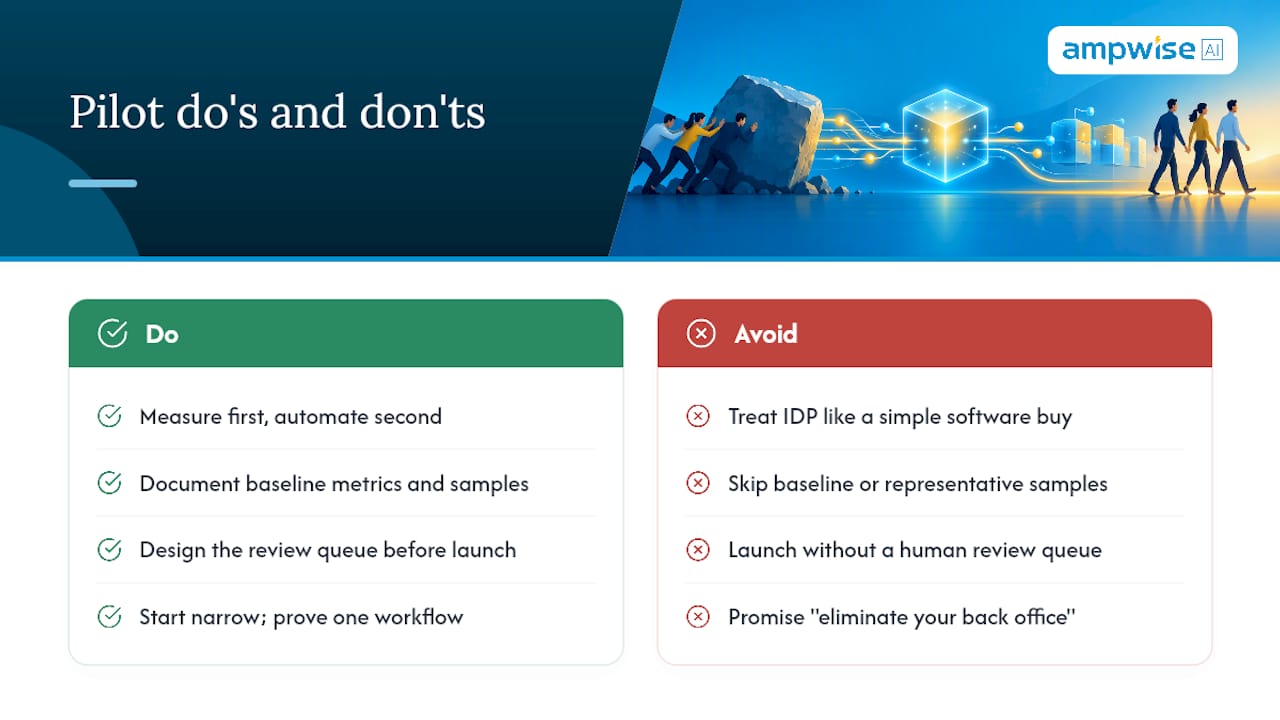
The organizational shift matters more than most vendors admit. Staff freed from data entry don’t disappear from the process, they move to exception handling, vendor disputes, and the judgment calls software still can’t make. That’s a better use of a skilled employee’s time than retyping invoice totals, and it’s the honest case for adoption instead of the inflated “eliminate your back office” pitch you’ll hear elsewhere.
Start narrow. Prove it on one workflow with real baseline numbers before anyone greenlights a company-wide rollout.
— Evert
See How Ampwise Handles Email-to-ERP Automation
If your document bottleneck lives specifically in Outlook or Gmail, orders, inquiries, and invoices arriving as free-text emails, scanned attachments, and PDFs with no consistent format, Ampwise built its entire product around exactly that problem. It requires no templates and no workflow overhaul: it plugs directly into your existing inbox, reads the mess of formats B2B communication actually arrives in, and routes verified data into your ERP with one-click approval instead of manual retyping. Clients using Ampwise report cutting manual data entry by up to 90%, with ROI typically materializing within three months.

That combination, inbox capture plus human approval before anything hits your ERP, is the pilot design this article just walked through, already built. If email-to-ERP is your highest-volume, most error-prone workflow, it’s the natural place to start measuring. Visit the Ampwise product page to see how the workflow maps to your inbox, or check the company overview for a closer look at how the integration works before you request a demo.
Sources
- SAP reference architecture guidance for intelligent document processing
- What is Intelligent Document Processing? | IBM
FAQ
What is intelligent document processing?
Intelligent document processing is technology that reads documents, whether scanned paper, PDFs, or emails, and converts them into structured, validated data for business systems. It combines OCR, NLP, computer vision, and machine learning to classify, extract, and validate information before sending it downstream to an ERP or workflow tool.
What is the difference between OCR and intelligent document processing?
OCR only converts images of text into machine-readable characters, it has no understanding of what the text means. IDP uses OCR as one component inside a larger pipeline that also classifies the document type, extracts specific fields with context, validates them against business rules, and routes uncertain results for review.
What is the difference between IDP and RPA?
IDP handles unstructured or semi-structured documents, extracting and validating data from formats like free-text emails or scanned invoices. RPA automates repetitive digital tasks on already-structured data, clicking through screens or moving fields between systems, and typically consumes what IDP produces rather than replacing it.
What is intelligent processing?
“Intelligent processing” is generally shorthand for intelligent document processing, using AI to interpret and act on document content rather than just digitizing it. The distinction from basic automation is the added layer of classification, context-aware extraction, and validation, which is what lets systems handle varied, unstructured document formats without pre-built templates, an approach Ampwise applies specifically to email-based business documents.