
Quote to Order Automation: From Email Inbox to ERP

Quote to order automation moves a customer request from an email, PDF or spreadsheet into a confirmed order in your ERP without anyone retyping it. For wholesalers and manufacturers, the hard part is rarely the pricing engine. It is the inbox: free-text requests, odd attachments and customer-specific formats. Ampwise reads those emails directly in Outlook or Gmail, extracts and validates the data, and lets your team approve it into the ERP with one click.
TL;DR
- Quote to order runs from the first customer inquiry to a confirmed order. Oracle’s documentation lists quote creation, validation, approval, conversion and submission as its stages.
- Most delay and error happen at intake, where people rekey data from emails and attachments into the ERP.
- Every extracted field needs a source, a check and a defined exception, with a human reviewing anything uncertain.
- Measure the result with cycle time, first-time accuracy, review rate and cost per order.
- Ampwise works without templates, in Outlook and Gmail, and reduces manual data entry by up to 90%.
Table of Contents
- What the quote-to-order workflow covers
- Why the inbox is the bottleneck
- How quote email parsing works
- The rules that keep automated orders correct
- Keep a person in the loop where it counts
- Connecting email, ERP and your other systems
- How to tell whether it is working
- A practical rollout in five steps
- Where Ampwise fits
- Perspective
- FAQ
- Sources
What the quote-to-order workflow covers
In a formal model, the process starts with a customer inquiry and ends with a confirmed, submitted order. Oracle describes the steps as quote creation, validation and feasibility, approval, proposal generation, conversion to an order, order validation, approval and submission. When a quote converts, product selections, pricing, discounts and approvals transfer to the new order.
SAP describes the same chain in ERP terms: a quote is configured with products, payment terms, discounts, delivery schedules and validity dates, routed through approval rules, and after the customer accepts, the order is created in the ERP and its ID is written back to the quote for traceability.
That description assumes the request arrives as clean data. In a distribution or manufacturing business it usually arrives as an email that says “same as last time, but 400 instead of 250, deliver to the Dallas yard,” with a PDF drawing or a customer’s own purchase order attached. Someone has to read it, find the customer, match the items, check the price and type it all in. That manual step is where automation pays first.
Why the inbox is the bottleneck
A quote-to-order handoff has to keep line items, configuration details, approved prices, terms, notes, attachments and shipping details intact. M2B Commerce notes that preserving them avoids duplicate entry. Every manual retype is a chance to lose one of those details.
Three patterns cause most of the trouble:
- No standard format. Each customer sends requests differently, so template-based tools need constant upkeep.
- Mixed document types. Free text, PDFs, Excel files and scans all arrive in the same mailbox.
- Context buried in threads. Quoted replies, signatures and footers sit next to the actual request.
This is why we built Ampwise around the mailbox itself. It needs no templates or workflow changes and handles emails, PDFs, Excel files and scanned documents. For a deeper look at the intake side, see our guide to quote request automation from inbox to ERP-ready quote.
How quote email parsing works
Parsing turns a message into structured fields. A 2026 research paper on order emails describes a typical pipeline:
- PDF or image attachments are scanned with OCR (optical character recognition, which converts images of text into machine-readable text) and cleaned of noise.
- Several extractors run at once: a language model, named-entity recognition and rule-based extraction.
- A confidence-weighted score picks the final value for each field.
- Validation sorts each result into approved, needs review or rejected.
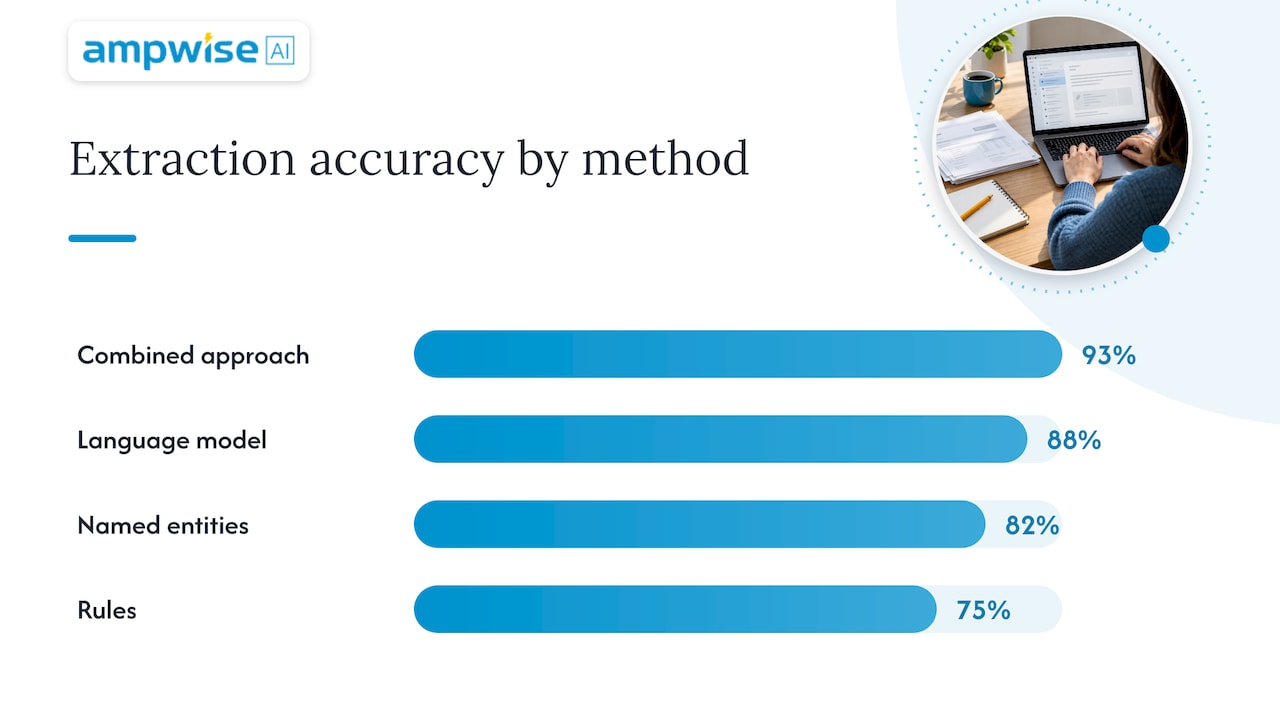
The same paper reports 93% extraction accuracy for the combined approach, against 88% for a language model alone, 82% for named-entity recognition and 75% for rules alone. It also reports 8 to 12 seconds of processing per email and a 75 to 85% reduction in manual effort. These are research results on one test setup, so treat them as a sense of scale, not a promise for your mailbox.
The lesson is that no single technique is enough. Mixed inputs need mixed methods and a routing step for the uncertain cases. Our article on email PDF parsing to ERP walks through how that works in practice, and the one on unstructured email extraction covers the hybrid approach.
The rules that keep automated orders correct
Extraction is only half the job. An order that is read correctly but breaks a business rule still causes a problem downstream. One published field map from Amulet Research gives each order field three things: a source, a check type and defined exception conditions. The check type is a deterministic rule, a master-data lookup, or an AI interpretation that only proposes a value.
| Field | Example check | Typical exception |
|---|---|---|
| Customer account | Sender matches an approved contact | Unknown sender or account on hold |
| Quantity | Present and within the item’s range | Missing, zero or out of range |
| Price | Matches the agreed price list | Differs from the list or has a tax conflict |
| Free-text notes | Read for context | Anything that changes price, delivery or approval goes to a person |
Format-strict fields such as dates, currency codes and email addresses should be validated deterministically. Nylas advises treating AI output as untrusted input and checking types, ranges and formats before data reaches the database. It also estimates that roughly 2% to 5% of extractions on messy real-world mail need a human.
We go deeper on this in data validation automation for email orders, ERP data validation rules and validating purchase orders before ERP release.
Keep a person in the loop where it counts
Good automation does not silently accept or silently discard doubtful data. It routes it. Documentation from one extraction tool shows the pattern: each field carries a confidence score and a review flag, and low-confidence fields go to a reviewer who sees the original next to the extracted value. Another approach caps a field’s confidence when the OCR reads a word poorly, so uncertain scans are flagged instead of trusted.
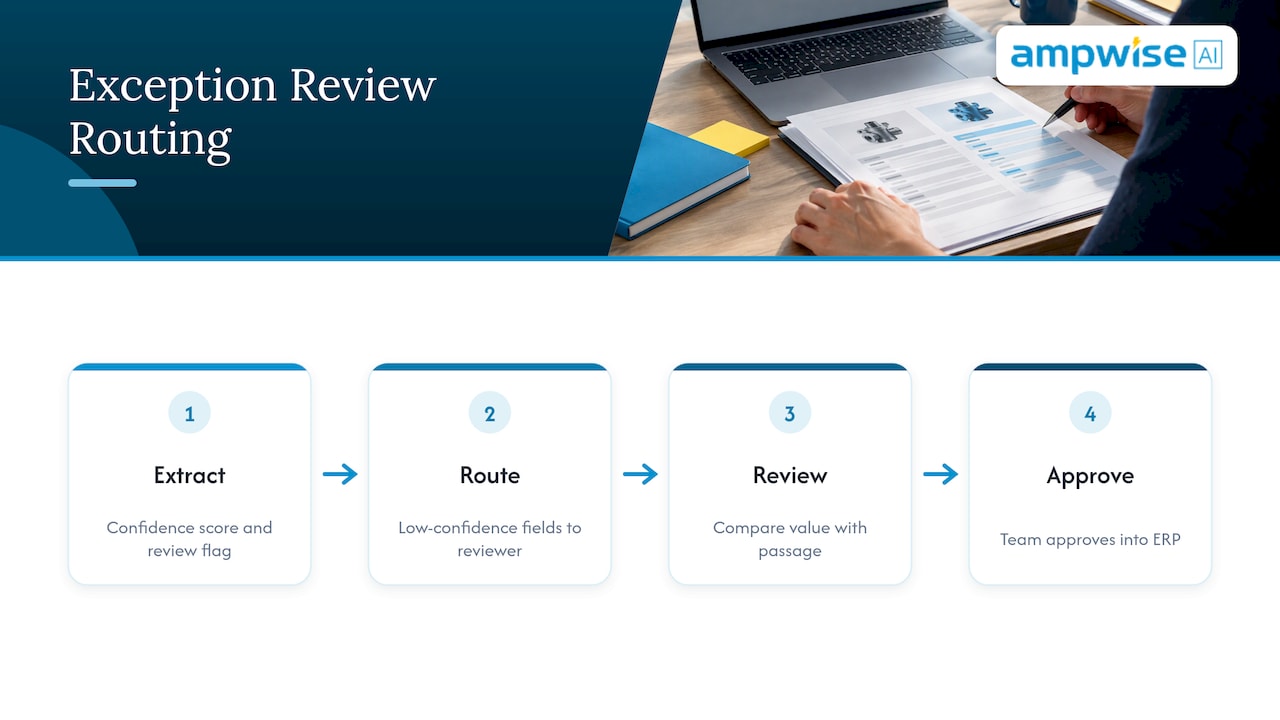
Two design principles follow. Keep the source passage attached to each value so a reviewer can check it at a glance. And treat confidence scores as routing hints, not as controls. For a broader view of designing these checkpoints, see this piece on audit-ready gates for human-in-the-loop AI.
Approvals should be intentional too. M2B Commerce argues that approval paths should protect margin, credit and capacity without becoming a black hole for routine work, and that assisted intake should supply structured draft data without bypassing pricing or credit controls. That matches how we work: Ampwise verifies the data and your team approves it into the ERP with one click, so people review exceptions instead of retyping everything. Read more in automating email orders with human review before posting.
Connecting email, ERP and your other systems
A workable setup has four connection points:
- Mailbox. The tool watches Outlook or Gmail, labels messages and tracks status, so nothing sits unread.
- Extraction and validation. Fields and metadata are pulled from the body and attachments, then checked against rules.
- ERP. Verified data is entered directly, using integration with your existing ERP.
- Write-back. The resulting order reference is tied back to the original request, the traceability step SAP describes above.
Ampwise supports multiple ERP integrations and covers orders, inquiries, invoices, PO confirmations and incoming goods, so the same mailbox pipeline serves sales, purchasing and receiving. Your staff keep working in the tools they know and need no retraining.
How to tell whether it is working
Pick a baseline before you start, then track a small set of numbers.
- Order cycle time. APQC found median cycle time of 2.0 days for organizations that measure and reward first-time data accuracy, versus 9.5 days for the rest.
- First-time accuracy. The same study reports that one manufacturer cut order entry errors from 1.6% to under 0.4% by focusing on it.
- Cost to process. APQC reports $1.11 per $1,000 of revenue for organizations with automated order management, versus $1.64 without.
- Review rate. The share of emails needing a human. A falling rate means your rules and extraction are maturing.
- Quote response time. How long from inbound request to a sent quote. Our piece on faster quote response for sales teams explains why fixing intake comes first.
The APQC data dates from 2018, so use it as a directional benchmark and compare against your own baseline. For a lens on tying operational accuracy to business outcomes, this guide to measuring the impact of accurate data shows how a structured platform makes results visible.
A practical rollout in five steps
- Map your intake. List the mailboxes, customers and document types that generate the most orders and quotes.
- Define fields and rules. For each field, set the source, the check and what counts as an exception.
- Start with one flow. Choose a high-volume mailbox, such as purchase orders from your top ten customers.
- Review at first, then relax. Approve everything manually at the start, then let clean, high-confidence orders move faster as the review rate drops.
- Expand. Add quote requests, PO confirmations and incoming goods once the first flow is stable.
Where Ampwise fits
Ampwise is subscription software that extracts, validates and enters orders, inquiries, invoices, PO confirmations and incoming goods from Outlook and Gmail into your ERP. It handles free-text emails, PDFs, Excel files and scans without templates, and our customers aim for ROI within three months.
If your team still retypes email requests into the ERP, see how Ampwise connects your email and ERP.
Perspective
Every wholesaler we talk to describes the same thing: the quote is not slow because of pricing, it is slow because someone has to read the email first. Templates never solved that, because customers do not follow templates.
Our view is that automation should meet the mailbox as it is. Read the free text, read the scan, check it against your rules, and hand a person a verified draft to approve. People stay in control of the decisions, and the retyping goes away.
That is why we built Ampwise to work inside Outlook and Gmail, with no workflow changes and no retraining. The best automation is the kind your team barely has to learn.
Evert
FAQ
What is the difference between quote to order and quote to cash?
Quote to order ends when a confirmed order is submitted for fulfillment. Quote to cash continues through invoicing and payment collection. Most teams start with quote to order because intake errors there flow into everything after.
Do I need standardized templates for quote email parsing?
Not with a modern AI parser. Ampwise reads free-text emails, PDFs, Excel files and scanned documents without templates, so customers can keep sending requests the way they do today.
Will automation remove human approval?
No. Uncertain or high-impact items should be routed to a person. With Ampwise, verified data is approved into the ERP with one click, so people spend time on exceptions instead of data entry.
How fast can a business see a return?
It depends on email volume and how much of it is manual today. Ampwise cites ROI within three months for businesses with heavy email workflows, and a clear baseline of cycle time and error rate lets you confirm it.
Sources
- Oracle: About the Quote-to-Order Business Process
- SAP Learning: Understanding the Quote to Order Stage
- M2B Commerce: Quote-to-Order Workflows
- IJISRT 2026: hybrid extraction of order emails
- Amulet Research: email and PDF order entry automation
- Nylas: Extract structured data from email
- ParsedMail: AI email parser
- Eigenpal: Extract Data
- APQC: Transform customer service and operations through order automation
- Audit-ready gates for human-in-the-loop AI
- Getting started with DataDelivery