
Tax and VAT Validation: What to Check Before an Invoice Hits Your ERP

Tax and VAT validation means confirming three things before a document is posted: the tax ID belongs to an active business, the tax treatment fits the transaction, and the tax math adds up. A registry lookup covers only the first. For companies whose orders and invoices arrive as PDFs, scans and free-text emails, the practical answer is to validate the data at the point it leaves the inbox and before it reaches the ERP. That is the step we built Ampwise AI around: it extracts, validates and enters data from Outlook and Gmail into your ERP, so a person approves verified data instead of retyping it.
TL;DR
- Validating a VAT ID is one component. Rate and arithmetic checks on the invoice are separate work.
- Official tools such as VIES (the EU’s VAT number checker) return valid or invalid. They do not by themselves entitle you to a VAT exemption.
- Keep a dated record of every check. In an audit, the supplier carries the burden of showing the check happened.
- Automate extraction and routine checks, and send exceptions to a person. Do not let silence count as approval.
- Ampwise AI reads emails, PDFs, Excel files and scans without templates, and lets your team approve verified data into the ERP in one click.
Table of Contents
- The three layers of tax and VAT validation
- Checking whether a business is VAT-registered
- What official lookups tell you, and what they do not
- Validating the invoice itself
- Why manual validation breaks down in email-driven workflows
- Automating tax and invoice validation
- Where Ampwise AI fits
- Perspective
- FAQ
- Sources
The three layers of tax and VAT validation
Teams often say “we validate VAT” when they mean “we looked up the number.” A VAT validation overview splits the work into three layers:
- Identity: the VAT ID belongs to a registered, active taxpayer.
- Rate: the correct rate was applied for the goods or services and the jurisdiction.
- Arithmetic: line-level and invoice-level tax totals are correct.
A number can pass a format check and still fail the first layer because it was deregistered. A correct total can sit on an invoice with the wrong rate. A Belgian guide makes the same point: a valid VIES number or a correct total does not validate the whole document, and it adds a review of required details such as invoice number, date, parties and reverse-charge wording.
For a wholesaler or manufacturer, this matters because each layer fails in a different place. Identity problems start when a customer or supplier is set up. Rate problems start with a wrong item or ship-to country. Arithmetic problems start with a misread line on a scanned PDF.
Checking whether a business is VAT-registered
A VAT identification number is the unique number identifying a taxable person or non-taxable legal entity registered for VAT. It tells you the customer’s tax status and helps determine where tax is due. Only tax administrations issue these numbers.
Where you check depends on the country:
- EU: use VIES, which returns valid or invalid for a business registered to trade cross-border.
- United Kingdom: the GOV.UK service checks a UK VAT number and returns the registered name and address. It cannot search by business name.
- Estonia, as one national example: the tax board’s KMKR validation tool returns the payer’s name, registry number and registration dates.
Finland’s tax authority advises checking a new EU counterpart’s VAT number before sending the first invoice and re-checking regularly. The check must use the number itself, not the company name. The same page notes that VIES accepts batch uploads of numbers with country codes, which helps when you are cleaning up a customer master file.
In the United States, there is no federal VAT, so a US business meets this problem when it sells to or buys from EU and UK counterparties. Domestic sales tax exemption certificates are a separate question and outside this article.
Why the check matters in money terms
The Dutch tax administration explains that checking a customer’s VAT ID is what allows a supplier to charge 0% VAT on intra-EU goods or reverse-charge VAT on services. If the customer turns out not to be a business, the supplier can face an additional assessment and a fine, and still owe the VAT. One unchecked number on a large pallet shipment can cost more than the order margin.
What official lookups tell you, and what they do not
Read the result narrowly. VIES gives a yes or no answer on whether a number is valid or matches a name or address. The Commission notes that, for data-protection reasons, national administrations do not always supply the name and address for a valid number. It also states that VIES does not itself give a right to exempt a supply from VAT.
An “invalid” answer is not always a fake number. Your Europe lists three possible causes: the number does not exist, has not been activated for intra-EU transactions, or the registration is not yet finalized. Changes are not always reflected immediately. For urgent cases it advises contacting the local tax administration.
Ireland’s Revenue adds a limit that surprises many teams: the VIES system can only confirm whether a specified number relates to a named trader. You cannot use it to find a number or the name behind one. The same manual says zero-rating depends on the supplier showing the supply went to an intra-EU VAT-registered person.
Format-only checks are weaker still. HMRC’s enquiry manual states that a number on an invoice may be false, and that a checksum-based check only confirms the format. It cannot confirm a current registration or that the number belongs to the person using it.
| Check | What it confirms | What it does not confirm |
|---|---|---|
| Format or checksum | The number is built correctly | That it was ever issued or is active |
| Registry lookup (VIES, HMRC) | The number is registered, sometimes with name and address | That the invoice rate or totals are right |
| Rate check | The tax treatment fits the goods and jurisdiction | That the counterparty is registered |
| Arithmetic check | Lines and totals reconcile | That anything else on the document is valid |
Validating the invoice itself
Once the ID is settled, work through the document in this order:
- Legal entity and identifier. Start with the legal entity named on the invoice and the exact number supplied. Check each identifier separately, because a VIES result for one number does not validate another number or a whole corporate group.
- Required details. Invoice number, issue date, both parties, description of goods, and any exemption or reverse-charge wording.
- Rate. Compare the rate to the goods and the place of supply. As an example of what the rate layer has to handle, Belgium’s main rates are 21%, 12% and 6%, plus 0% for certain transactions.
- Arithmetic. Recalculate line tax and totals. Rounding rules differ by jurisdiction, so a one-cent difference is not always an error.
- Business match. Compare the invoice against the purchase order and receipt. Our guide on three-way match automation walks through that comparison for email-heavy AP teams.
The fifth step is where tax validation meets order and invoice processing. Tax checks tell you the invoice is tax-correct. They do not tell you the goods were ordered or received.
Why manual validation breaks down in email-driven workflows
In wholesale and manufacturing, tax data rarely arrives as clean structured files. It arrives as a PDF attached to an email, a scan of a delivery note, or a spreadsheet from a customer’s buyer. Someone reads the VAT ID, retypes it into the ERP, and maybe pastes it into a lookup page. Three things go wrong:
- Transcription errors. A single swapped digit turns a valid ID into an invalid one, or worse, into someone else’s valid ID.
- Skipped checks. Under deadline pressure, the lookup is the first step to be dropped, and nothing records that it was.
- No trail. The result lives in a browser tab, not on the transaction.
Validation that depends on a busy person remembering to do it is validation that fails at month end. That is why the extraction step matters as much as the lookup: if the number is read wrongly, every check after it is a check on the wrong data. Our write-up on field-level invoice data extraction explains how to measure that accuracy.
Automating tax and invoice validation
Automation can handle the repetitive part: pull the VAT number, rates, quantities and totals from the document, compare them with rules, and flag what does not fit. The design question is what happens to the result.
A few principles from official and professional guidance:
- Keep states separate. “Valid,” “invalid” and “could not verify” are three different outcomes. A registry outage is not a rejection, and it is not an approval.
- Do not cache “active” for long. Registration can be cancelled at any time, and authorities expect a check at the time of each supply. Finland’s tax authority recommends re-checking regularly.
- Route mismatches to a person. If the identity returned does not line up with the details on the document, a reviewer decides, not the system.
- Audit the rules. A validation that checks nothing, such as a tolerance left blank, produces a pass that means nothing. Review the configuration before trusting the green lights.
Our article on ERP data validation rules lists rule types and examples you can adapt, and the guide to data validation automation for email orders shows where in the flow they sit. For the exceptions that remain, a defined path matters: see our process for invoice exception handling.
Keep a record that survives an audit
The Dutch and Finnish tax authorities both stress that the supplier bears the risk. Your Europe recommends keeping track of the validation in case of a tax control. For each transaction store:
- the number exactly as checked and the issuing country
- the date and time of the check
- the result (valid, invalid, could not verify)
- the name and address returned, where the registry provides them
- a consultation reference where the service issues one
The UK service goes a step further: UK VAT-registered businesses can provide their own VAT number to get proof of when they checked. Attach that proof to the transaction, not to a shared folder.
A worked example
A German-based customer emails a purchase order as a scanned PDF. Your sales team enters it, and the order ships to Austria on a reverse-charge basis. The VAT ID on the PDF has one digit misread.
With manual entry, the wrong ID goes into the ERP, nobody looks it up, and the invoice goes out at 0%. Months later an audit shows the number belongs to nobody, and you owe the VAT.
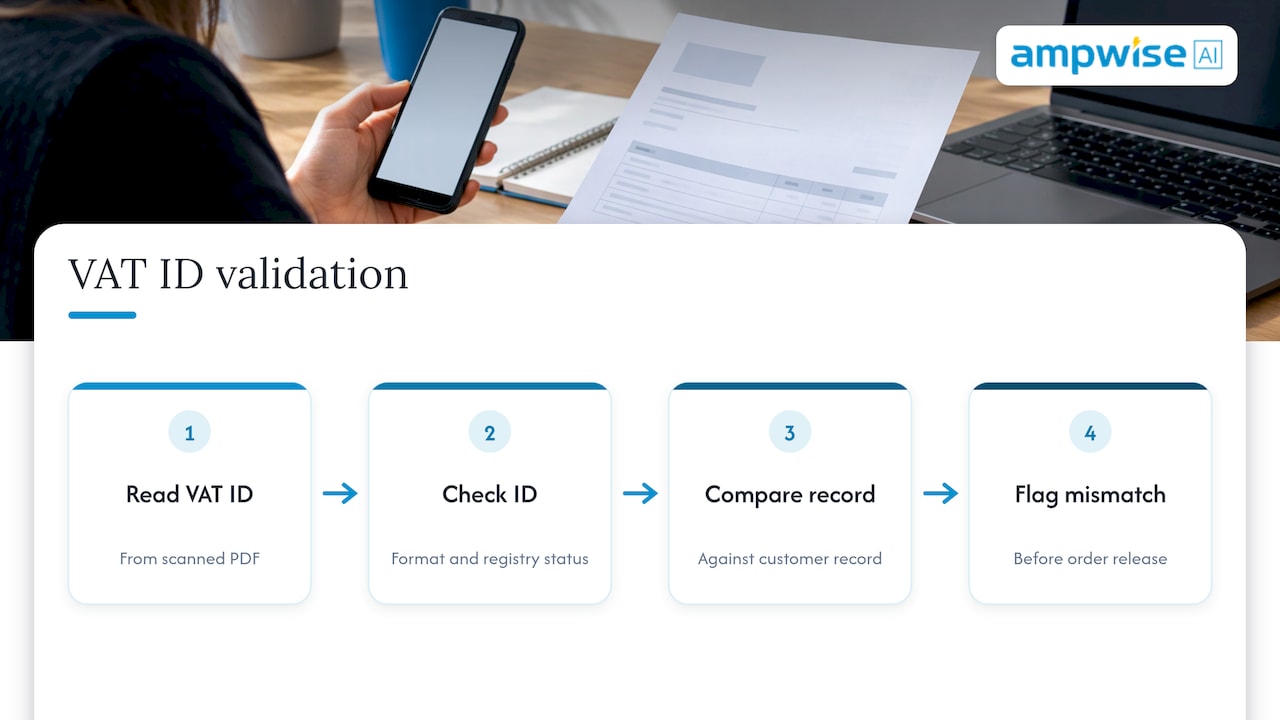
With validation at extraction, the number is read from the document, checked against its format and the registry, and compared with the customer record. The mismatch is flagged before the order is released. A person looks at one highlighted field instead of re-reading the whole document.
Where Ampwise AI fits
Tax validation has to happen somewhere in the path from inbox to ledger. We built Ampwise AI for that path. It automates extraction, validation and direct entry of orders, inquiries, invoices, PO confirmations and incoming goods from Outlook and Gmail into your ERP. It handles emails, PDFs, Excel files and scanned documents without templates, so a new customer’s format does not need a new setup.
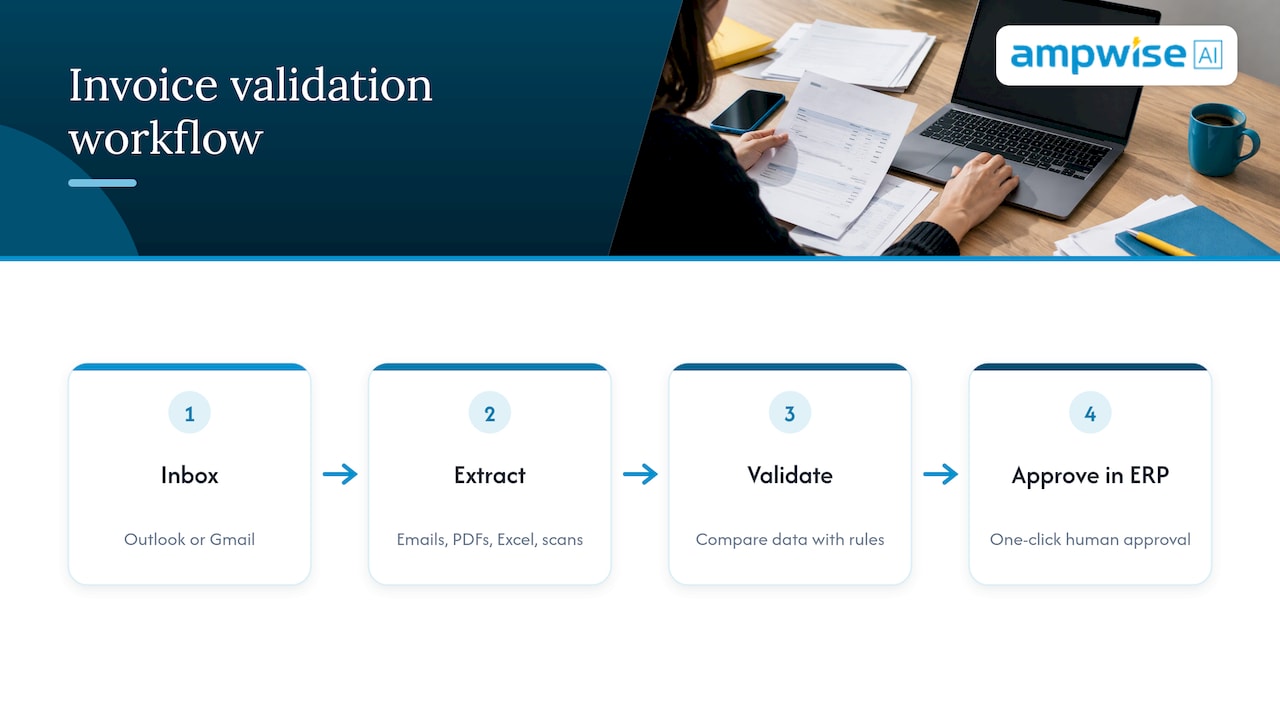
Your team sees verified data and approves it into the ERP in one click, which keeps a person in charge of the decision while taking the retyping off their desk. Our human-in-the-loop approval guide covers how to set that up. Ampwise works directly in the mailbox, integrates with existing ERP systems and needs no staff retraining. Our aim is to cut manual data entry by up to 90%, with typical ROI inside three months.
If you want to see how that would look on your own order and invoice mix, start on the Ampwise AI page.
For AP teams planning a rollout, the invoice automation pilot guide lays out a two to four week approach for email and scanned invoices.
Perspective
Most validation failures we hear about are not failures of the registry lookup. They happen earlier, when a number or a rate is read wrongly from a document and then checked as if it were right.
That is why we put validation next to extraction rather than after posting. When the data is read, checked and shown to a person before it enters the ERP, the person approves facts instead of typing them. Our view is that the inbox is where order and invoice quality is decided, because that is where the documents arrive in every shape imaginable.
We also believe in keeping people in the loop for the judgment calls: an exemption, a mismatch, a counterparty that could not be verified. Automation should clear the routine cases quickly and put the unusual ones in front of the right person with the evidence attached. That is how Ampwise is designed to work, with no templates and no change to how your team already uses Outlook, Gmail and the ERP.
Evert
FAQ
What is VIES VAT validation?
VIES is the European Commission’s system for checking whether a VAT number is registered for cross-border trade within the EU. It returns valid or invalid, and in some countries a name and address. It is one input to your tax decision, not the decision itself.
How do I know if a company is registered for VAT?
Use the official checker for its country: VIES for EU numbers and the GOV.UK service for UK numbers. Enter the full number with its country prefix. Search by company name is not supported by these tools, so get the number from your counterparty first.
How often should I re-check a customer’s VAT number?
Check before the first invoice and re-check regularly, as Finland’s tax authority advises. Registration can change at any time, so many finance teams also re-check when a customer’s name, address or country changes. Store the date and result each time.
What if VIES says a number is invalid?
The number may not exist, may not be activated for intra-EU trade, or the registration may not be finalized yet. Hold the zero-rated treatment, ask the customer to confirm the number, and contact the local tax administration if the matter is urgent. Document what you did.
Sources
- What Is VAT Validation?
- Check VAT on an invoice: Belgian numbers, VIES and totals
- VAT identification numbers, Taxation and Customs Union
- Check a VAT number (VIES), Your Europe
- Check a UK VAT number, GOV.UK
- VAT number validation, Estonian Tax and Customs Board
- VAT number, Finnish Tax Administration
- VAT identification number check, Belastingdienst
- VIES enquiries, European Commission
- The VIES Traders Manual, Irish Revenue
- EM3058 False Invoices, HMRC
- VAT Validation for Invoices