
Unit of Measure Conversion: A Practical Guide for B2B Order Teams

Unit of measure conversion means changing a quantity from one unit to another without changing its value: meters to feet, kilograms to pounds, or cases to individual units. The math is simple. The hard part in B2B is that every email, PDF and spreadsheet your customers send uses a different unit, and someone has to convert it correctly before it reaches your ERP. We built Ampwise to take that entry work off your team: it extracts order data from Outlook or Gmail, validates it, and lets you approve it into your ERP in one click.
This guide covers the method, the factors worth memorizing, the rounding rules, and the controls that keep unit errors out of your orders.
TL;DR
- A conversion factor is a ratio equal to one. Multiply by it so the old unit cancels and the new unit remains.
- Use exact factors (1 inch = 2.54 cm, 1 lb = 0.45359237 kg) and round once, at the end.
- In an ERP, define one base unit per item and map every pack level (inner pack, case, pallet) to it.
- Write order lines with the pack size explicit: “10 cases, 24 per case” rather than “10 mugs”.
- Most unit errors start in inbound emails and attachments, so check quantities before they post.
Table of Contents
- How a conversion factor works
- Conversions worth knowing
- Exact factors and rounding
- Where conversion goes wrong in B2B order flow
- Set up units in your ERP so conversions stay consistent
- Catch unit errors where orders arrive
- Measuring whether it works
- Put email-to-ERP automation to work
- Perspective
- FAQ
- Sources
How a conversion factor works
The National Institute of Standards and Technology (NIST) describes unit conversion as multiplying or dividing by a numerical factor, choosing the right number of significant digits, and rounding. The factor is a ratio whose top and bottom hold the same value in different units, so it equals one. Multiplying by one changes the unit and leaves the quantity untouched.
The working method has five steps:
- Identify the units you start with.
- Identify the units you need.
- Find the exact conversion factor.
- Arrange the factor so the unwanted unit cancels, then calculate.
- Ask whether the result makes sense.
A worked example from OpenStax University Physics: 80 m × (1 km / 1000 m) = 0.080 km. The meters cancel, and kilometers remain. From one relationship you can build two factors, one the inverse of the other. As RMIT’s Learning Lab shows, 1000 mg = 1 g gives both 1 g / 1000 mg and 1000 mg / 1 g. You pick the one with the wanted unit on top: 150.0 mg becomes 0.1500 g, and 0.275 g becomes 275 mg.
Step five matters most in practice. If a 5 kg bag converts to 0.011 lb, the check fails immediately, because a kilogram is heavier than a pound.
Conversions worth knowing
Metric units move by powers of ten. NIST Handbook 44 (2024), Appendix C gives the basics:
- Length: 10 mm = 1 cm, 100 cm = 1 m, 1000 m = 1 km
- Area: 10,000 cm² = 1 m², 10,000 m² = 1 hectare
- Volume: 1000 mL = 1 L, 1000 L = 1 m³
- Mass: 1000 g = 1 kg, 1000 kg = 1 metric ton
- Avoirdupois weight: 16 oz = 1 lb, 2000 lb = 1 ton
For quick metric-to-US estimates, NIST’s approximate conversion card lists these values:
| Quantity | Metric | Approximate US equivalent |
|---|---|---|
| Length | 1 m | 3.28 ft or 1.09 yd |
| Length | 1 km | 0.62 mi |
| Mass | 1 kg | 2.20 lb |
| Mass | 1 metric ton | 1.10 short ton |
| Volume | 1 L | 0.26 gal or 1.06 qt |
| Volume | 1 m³ | 35.31 ft³ |
| Area | 1 ha | 2.47 acres |
Temperature is the exception, because it needs an offset and not just a ratio: °F = (°C × 1.8) + 32, and K = °C + 273.15.
Two names cause trouble in orders. A metric ton is 1000 kg, while a US short ton is 2000 lb. A US gallon is also not an imperial gallon, so confirm which one a supplier means.
Exact factors and rounding
Approximations are fine for estimates. Orders, specs and invoices need exact factors. NIST Special Publication 1038 explains that US customary units are defined in terms of SI units, so the inch is exactly 2.54 cm, the pound is exactly 0.45359237 kg, and the US gallon is 3.785412 L.
The same publication sets out the habits that prevent drift:
- Combine compound values into the smaller unit first: 12 ft 5 in becomes 149 in.
- Keep all digits through the calculation.
- Round once, at the end.
The purpose of the number decides how you round. A technical specification follows the significant-digit rule (60.5 mi becomes 97.4 km). A legal limit must round so the metric value never breaks the limit (a 10 ft clearance becomes 3.05 m). Packaged goods follow net-quantity rules that may allow rounding down.
Where conversion goes wrong in B2B order flow
The formula is rarely the problem. The trouble is that the unit is ambiguous or hidden:
- A customer emails “10 mugs, $48” when the price is per case of 24.
- A PDF lists a length in millimeters while your item master stores meters.
- A supplier confirmation shows a pallet quantity where you expect cases.
- A fractional result, such as 1.5 cases of an item sold only in full cases, gets rounded without anyone deciding to.
Once a wrong quantity posts, it spreads into stock, costs and margin. One detailed SAP Business One guide points out that each document line stores the factor applied when it was created. Fixing master data later stops the error from continuing, but it does not repair documents already posted.
Set up units in your ERP so conversions stay consistent
These practices apply in most ERP systems, even though the screens differ.
Choose one base unit per item
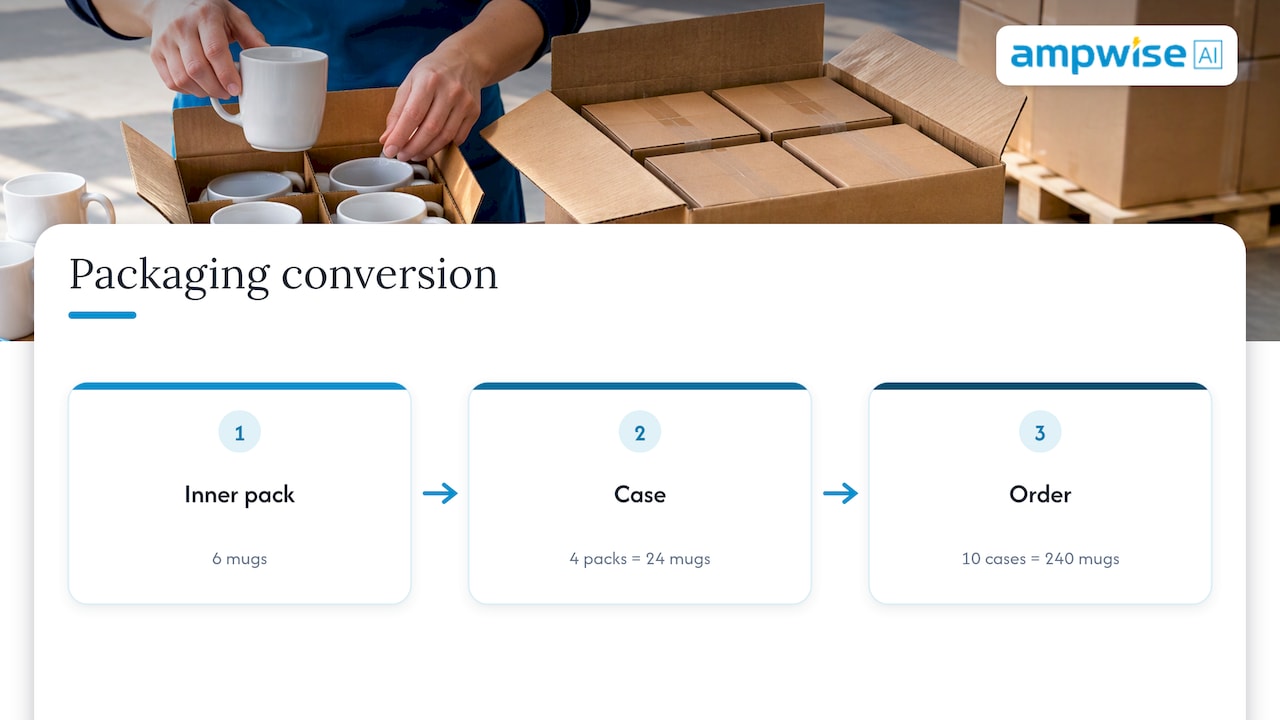
Pick the smallest unit you actually transact, then map every level above it. A wholesale guide gives a clean example: 6 mugs per inner pack and 4 packs per case make 24 mugs per case, so 10 cases are 240 mugs.
Keep cost and quantity on the same basis
If a case costs £48 and holds 24 mugs, the unit cost is £2. Mixing a case price with a unit quantity is the most common way margin quietly disappears.
Make order lines explicit
Write “10 cases, 24 mugs per case, £48 per case”. The same guide recommends this over “10 mugs, £48”, because the pack level and the price basis are both visible.
Keep the quantity in the factor, not the unit name
The quantity belongs in the group conversion, so avoid unit names such as BOX-24. Never change a factor while historical movements are open. Create a new group and migrate instead. Audit conversions regularly and restrict manual editing of per-line unit fields.
Match barcodes to the packaging level
Barcodes should identify whether you are scanning a unit, a pack, a case or a pallet. Test conversions on physical stock before a container receipt multiplies a mistake across thousands of units, and treat fractional quantities as a decision, not an automatic rounding.
To go deeper on controls, see our guide to ERP data validation rules and our piece on supplier part number mapping, which pairs naturally with unit mapping because the same part often carries a different pack size at each supplier. For a broader view of ERP-side controls for product-specific units, this GS1 pilot for product data shows how structured identifiers support packaging levels.
Catch unit errors where orders arrive
ERP rules only see data that someone has already typed in. The earlier you check units, the cheaper the fix. For teams whose orders arrive as emails, PDFs, Excel files and scans, that means checking at extraction.
A workable routine:
- Extract the quantity, unit, pack size and price basis from each line.
- Compare them with the item master: base unit, allowed pack levels and expected price range.
- Flag mismatches such as a unit the item never uses, a fractional case, or a price that implies the wrong basis.
- Approve only verified lines into the ERP.
This is the workflow Ampwise supports. It reads orders, inquiries, invoices, PO confirmations and incoming goods from Outlook and Gmail, handles free-text emails and scanned documents without templates, and lets you approve verified data into your ERP with one click. Our own claim is that this cuts manual data entry by up to 90%. Related reading: validating purchase orders before ERP release and automating email orders with human review before posting.
Measuring whether it works
Track the numbers that unit errors distort: corrected order lines, returns caused by wrong quantities, and the time between receiving an order and posting it. Our order processing KPIs guide covers how to read them, and the automation monitoring dashboard article lists what to watch once automation is live.
Put email-to-ERP automation to work
If your team still retypes quantities from customer emails, Ampwise works directly in Outlook and Gmail, needs no templates or workflow changes, and connects to your existing ERP without retraining staff. See how it fits your order flow on the Ampwise site.

Perspective
Every unit error I have seen traced back to the same moment: a person reading a quantity in an email and retyping it into a system, with the pack size living only in their head.
The conversion formula is not the weak point. Ambiguity is. A customer writes “20 boxes”, your ERP stores pieces, and nobody wrote down how many pieces a box holds. The fix is to make that context visible on every line and check it before the order posts.
That is why we built Ampwise around the inbox. Orders arrive in many shapes, so the software has to understand free text, PDFs and scans without asking customers to change how they write. Then your team approves clean, verified data instead of typing it.
Evert
FAQ
What are the basic unit conversions?
Memorize the metric ladder: 10 mm = 1 cm, 100 cm = 1 m, 1000 m = 1 km, 1000 g = 1 kg, and 1000 mL = 1 L. For the cross-system basics, 1 inch is exactly 2.54 cm and 1 lb is exactly 0.45359237 kg.
How do I convert cm, mm, m and km?
Move by powers of ten. To go from meters to centimeters multiply by 100, and to go from meters to kilometers divide by 1000. For example, 80 m is 0.080 km.
How do I convert metric to US standard?
Multiply by the exact factor, keep every digit, and round once at the end. Inches become centimeters by multiplying by 2.54, and gallons become liters by multiplying by 3.785412. Use the approximate card values only for estimates.
How do I avoid case-versus-unit mistakes in orders?
Define a base unit for each item, map every pack level to it, and keep price and quantity on the same basis. Write order lines with the pack size stated, and check quantities before they post to the ERP.
Sources
- Unit Conversion, NIST
- Approximate Conversions from Metric to U.S. Customary Measures, NIST
- NIST Handbook 44 (2024), Appendix C
- NIST Special Publication 1038
- Unit Conversion, University Physics Volume 1, OpenStax
- Units and conversions, RMIT Learning Lab
- SAP Business One units of measurement guide
- Preventing wholesale case-pack and unit errors