
Contract Pricing Validation: How to Check Every Order Price

Contract pricing validation is the step where the price on an incoming order, PO or confirmation is compared with the price your company agreed with that customer or supplier, before the order is released into the ERP. Done by hand, it depends on someone remembering the deal, finding the right tier and spotting a mismatch in a PDF. Done well, it happens on every line, every time, and only the exceptions reach a person. That is what we built Ampwise for: it reads orders and confirmations from Outlook or Gmail, extracts and validates the data, and lets you approve verified data into your ERP in one click.
TL;DR
- Validate against the governing contract and your ERP’s price data, never against the price printed on the customer’s PO, which may be outdated or previously quoted.
- Compare like with like: same unit of measure, currency, effective date and quantity tier.
- Set a clear precedence order (customer contract, group contract, base price) and write down who may override it.
- Route mismatches to a short exception queue instead of silently correcting or silently accepting them.
- Email is where most prices enter the business, so validation works best when it starts at the inbox.
Table of Contents
- What contract pricing validation actually checks
- How ERP systems apply contract prices
- Where email breaks the chain
- A step-by-step validation routine
- Contract data you must keep current
- Why validate at the inbox, not after entry
- Putting Ampwise to work on your order flow
- Perspective
- FAQ
- Sources
What contract pricing validation actually checks
In wholesale and manufacturing, the price that matters is rarely the list price. It is the price in a customer-specific agreement: a special deal, a volume tier, a rebate, a fixed rate for a year. Validation answers one question per order line: does this price match what we agreed, for this customer, this product, this quantity, on this date?
Order entry teams usually do this informally. They open the customer’s contract, look at the quantity, and hold the order if the PO price does not fit. The problem is not skill, it is volume. When orders arrive as free-text emails, scanned PDFs and Excel attachments, the contract lookup is repeated by hand for every line, and errors accumulate quietly, deal by deal, rather than as one visible mistake.
A reliable check needs these inputs:
- Who: the customer account, plus the group or branch it belongs to.
- What: the product or SKU and the category that decides which rules apply.
- How much: the ordered quantity, so the right volume tier is picked.
- In what terms: the currency and unit of measure, for example per case or per each.
- When: the order date against the contract’s effective and expiration dates.
- Exceptions: approved manual overrides, with a reason.
A price such as $120 means nothing without those six. The same number can be a perfect match or a 12-fold overcharge depending on the unit.
How ERP systems apply contract prices
It helps to see how the large ERP vendors themselves treat this, because your validation has to agree with how your ERP will price the order once it lands.
Oracle’s JD Edwards documentation lays out a pricing sequence: an entered item price overrides the base price, a trade discount from the customer’s billing instructions overrides all other pricing, a contract price for a specific customer takes precedence over a customer-group contract price and must fall within the contract’s effective dates, and only then do inventory pricing rules and the base price apply. The lesson is that precedence is a design decision. If your validation does not follow the same order as your ERP, you will flag correct prices and miss wrong ones.
Oracle Order Management shows the same logic at the point of order entry. According to its sales agreement documentation, the system passes the sold-to party, business unit, currency and system date to contract management, which filters for active agreements covering that date. Pricing then prices each line per the agreement, and at submission the order is validated to confirm the contract is active, the date is within the contract period, and the contract line and version are valid. The example in that documentation: a $1,000 list price with a 10% agreement discount prices at $900.
On the purchasing side, PeopleSoft’s contract pricing for purchase orders searches approved contracts of the right process type, picks the most recent contract whose begin date has already passed, and stamps the transaction with the contract information. It does not apply to blanket POs, a good reminder that every system has blind spots you need to know about.
Syspro takes a strict stance. With Contract Compliance Management switched on for customers with contract pricing, stock codes that are not on an active contract are rejected unless an override is enabled, and without an override the price fields are locked so the contract price stands. Credit notes, transfers and consolidation orders are not checked.
Two takeaways for your own process:
- Your ERP can only validate what is entered in it. If the contract terms never made it into the system, or the order arrives by email and is typed in by hand, the ERP’s checks start too late.
- Dates and versions are as important as the price. An expired agreement or a superseded price list that still resolves against live orders is a common source of leakage.
Where email breaks the chain
Most wholesale and manufacturing teams do not receive clean, structured orders. They receive an email with a PDF, a spreadsheet in the customer’s own layout, or a scanned purchase order with handwritten changes. The customer’s PO price is whatever their buyer typed, often copied from an old quote.
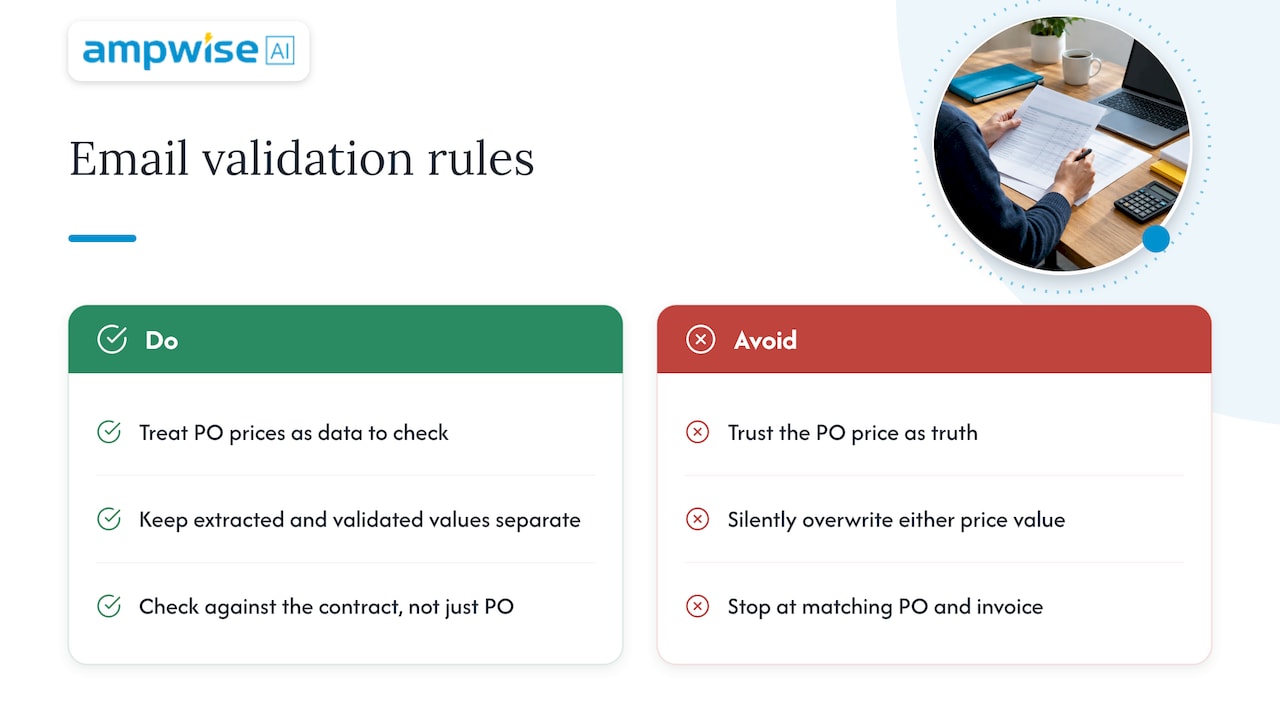
That is the first rule of automated validation: the PO price is data to be checked, not truth to be trusted. The authoritative price comes from your ERP, your pricing database or your approved business rules. A good workflow keeps the extracted value and the validated value separate, so a difference is highlighted rather than silently overwritten in either direction.
The second rule is that the check should not stop at the PO. An invoice or order confirmation can agree with the PO and still depart from the contract, for instance when the order used an outdated rate. Matching documents against each other confirms that they agree with each other, not that they agree with the deal. If you work through account-level terms, renewals and amendments across several systems, the guidance on choosing account management software shows how teams keep customer-side records current, which is exactly the discipline contract prices depend on. For the matching side, our guide to 3-way match automation covers where PO, receipt and invoice checks fit.
A step-by-step validation routine
Here is the routine we recommend for order and PO confirmation teams. Each step also shows where it usually goes wrong.
1. Capture the order and identify the customer
Read the email, the attachment and any free text. Identify the sold-to account and the ship-to. Where it goes wrong: customers use different names, branch codes or abbreviations, and a wrong account match means the wrong contract is applied. Ampwise extracts orders from emails, PDFs, Excel files and scanned documents without templates, so the customer’s own layout does not need to change.
2. Extract line-level fields
Pull product, quantity, unit, unit price, currency and requested date for every line. Where it goes wrong: totals get extracted instead of unit prices, or a free-text note such as “same price as last time” is ignored. Line-level extraction matters more than document-level extraction here.
3. Normalize units and currency
Bring the order price and the contract price to the same unit, currency and included charges before comparing. A $50.00 per case invoice against a $5.00 per each contract with 10 each per case is an exact match, but only after conversion. A $22.00 per bag price against $1.10 per kilogram cannot be judged until the bag weight is documented, and should stay unresolved rather than be guessed. Our guide to unit of measure conversion goes through the conversion rules B2B order teams need.
4. Find the governing contract and apply precedence
Select the agreement that is active on the order date, for this customer, covering this SKU. Apply your precedence order: customer-specific contract first, then group contract, quantity-based price, then standard wholesale price. Where it goes wrong: two agreements overlap, a newer one has not been loaded, or an expired one is still active. Effective and expiration dates on every agreement, and one source of truth for price, prevent most of this.
5. Compare and classify the result
Every line ends in one of four outcomes:
| Outcome | Meaning | Action |
|---|---|---|
| Match | Order price equals the contract price after normalization | Pass the line |
| Within tolerance | Difference falls inside a rule you set, such as a rounding cent | Pass with a note |
| Mismatch | Order price differs from the contract price | Send to the exception queue |
| Cannot verify | No contract found, or units cannot be reconciled | Mark as unknown, never as compliant |
The last row matters. A missing contract should become a visible exception, not a fabricated match. For tolerance, decide in advance what is acceptable, for example a two-cent rounding difference passes while a 10% discrepancy goes to review. Those thresholds are yours to set and should be written down.
6. Handle exceptions with a reason
A mismatch has three common causes: the customer used an old price, your contract data is wrong or incomplete, or a deal was agreed verbally and never recorded. Each calls for a different fix: reply to the customer, correct the master record, or get an approved override with a reason code. Limit who can override, and log who did. Our ERP approval workflow guide explains how to design approvals that keep orders moving.
7. Release to the ERP only after validation passes
Only create or update the ERP order when the required checks have passed or an exception has been approved. Ampwise supports this with one-click approval of verified data into the ERP, and you can read how that works for managers in our one-click approval workflow article.
Contract data you must keep current
Validation is only as good as the reference it checks against. A price master loaded once and never updated drifts away from the contract with every amendment. Treat each amendment, renewal or price-list change as an event that either updates the reference data or leaves it behind.
Practical habits that keep the reference trustworthy:
- Name an owner for contract pricing data, with an approval step for changes.
- Record effective and expiration dates on every agreement, and review those about to expire.
- Store terms as structured fields (price, tier, unit, currency, dates) rather than only in PDFs or spreadsheets that no system reads.
- Document unit conversion factors, such as pieces per case or weight per bag.
- Write down the tolerance rules and the override rules.
The same principle applies to ERP-side rules. Our overview of ERP data validation rules covers the types of rules and how to set them up, and validating purchase orders before ERP release covers the checks that should run before a PO is released.
Why validate at the inbox, not after entry
The cheapest place to catch a wrong price is before anyone types it. Once a wrong price is in the ERP, it flows into picking, shipping and invoicing, and the correction becomes a credit note, a dispute and a conversation with the customer. Catching the mismatch while the order is still an email means the fix is one reply.
For teams that handle orders from Outlook or Gmail, that is the case for working where the order arrives. Ampwise works directly in your mailbox, needs no templates or workflow changes, and integrates with existing ERP systems without retraining staff. For Priority users, we describe the full path in Priority ERP email order processing.
For audit and compliance-minded teams, a validation step is only as defensible as its record. Keep a trail of what was extracted, what was checked, who approved an exception and when. Our ERP audit trail guide explains what auditors look for beyond standard system logs.
Putting Ampwise to work on your order flow
If your orders, PO confirmations or invoices arrive by email and end up in an ERP, Ampwise automates extraction, validation and entry. It handles emails, PDFs, Excel files and scanned documents, supports multiple ERP integrations, labels and tracks emails by status, extracts metadata, and lets you approve verified data into the ERP in one click. Our clients see manual data entry reduced by up to 90%, with faster order processing, fewer errors and lower operating costs.
If you want to see how that looks on your own order mix, start at Ampwise AI and tell us which ERP and which mailbox you work with.
Perspective
Every price error we hear about has the same origin: the agreed price lived in one place, the order lived in another, and a person was asked to bridge the gap from memory. Contract pricing validation is not a clever calculation. It is making sure the agreed price is visible at the moment an order arrives.
That is why we start in the inbox. Orders do not arrive as tidy records, they arrive as emails, PDFs and spreadsheets in every customer’s own format. If validation only begins after someone has keyed the order into the ERP, you are checking late. We built Ampwise to read the document as it comes in, extract the lines, and prepare verified data so your team approves instead of retypes.
Our advice is to be strict about what counts as truth. The customer’s PO price is an input. The contract and your ERP are the reference. Keep those apart, set your precedence and tolerance rules once, and let your people spend their time on the exceptions that need judgment.
Evert
FAQ
What is the difference between contract pricing validation and a three-way match?
A three-way match compares the PO, the receipt and the invoice with each other. Contract pricing validation compares the price with the negotiated agreement. An invoice can pass a three-way match and still be wrong if the PO itself used an outdated rate, which is why the contract check is a separate control.
Which details do I need to validate a price reliably?
You need the customer account, the product or SKU, the quantity, the unit of measure, the currency and the order date, plus the contract’s price tiers and effective dates. Without the unit and the date, a matching number can still be the wrong price.
How should I handle an order with no matching contract?
Mark it as unverified and send it to a person, rather than letting it pass as compliant. Some ERPs, such as Syspro with Contract Compliance Management enabled, reject lines that are not on an active contract unless an override is explicitly allowed.
Can validation work on emails and scanned PDFs?
Yes, as long as line-level fields are extracted accurately first. Ampwise processes emails, PDFs, Excel files and scanned documents without templates, then validates and prepares the data for one-click approval into your ERP.
Sources
- Understanding Standard Price Adjustments, Oracle JD Edwards 9.2
- Overview of Setting Up Sales Agreements in Order Management, Oracle 26c
- Contract Pricing for Requisitions and Purchase Orders, Oracle PeopleSoft 9.2.058
- Contract Compliance Management, Syspro 8 2026 R2