
Invoice Coding Automation: How It Works and What to Check

Invoice coding automation means software reads each supplier invoice, assigns the right general ledger account, cost center and other dimensions, checks the result, and sends it to your ERP for approval. Your team stops retyping and re-deciding the same codes all day. For companies whose invoices arrive by email as PDFs, scans and free-text messages, the biggest gain comes before the coding itself: getting clean, verified data out of the inbox and into the ERP without anyone keying it in. That is the job Ampwise was built for, working directly inside Outlook and Gmail.
TL;DR
- Invoice coding is the step where each invoice line gets its account, cost center, project or tax code. Automation applies that logic consistently instead of leaving it to whoever opens the email.
- Coding quality depends on capture quality. If extraction from emails, PDFs and scans is shaky, every later step inherits the errors.
- Most of the cost sits in exceptions: missing PO numbers, price mismatches, unclear lines. Judge any setup by how it handles them.
- A human approval step and a full audit trail are what keep automated coding safe for finance and auditors.
- Ampwise extracts, validates and enters invoice data from Outlook and Gmail into your ERP, with one-click approval of verified data and no templates.
Table of Contents
- What invoice coding automation is (and is not)
- How automated invoice coding works, step by step
- Why exceptions decide the result
- A worked example: a wholesaler with a shared mailbox
- What to assess before you automate coding
- How to measure whether it is working
- Getting started without a big project
- Where Ampwise fits
- Our perspective
- FAQ
- Sources
What invoice coding automation is (and is not)
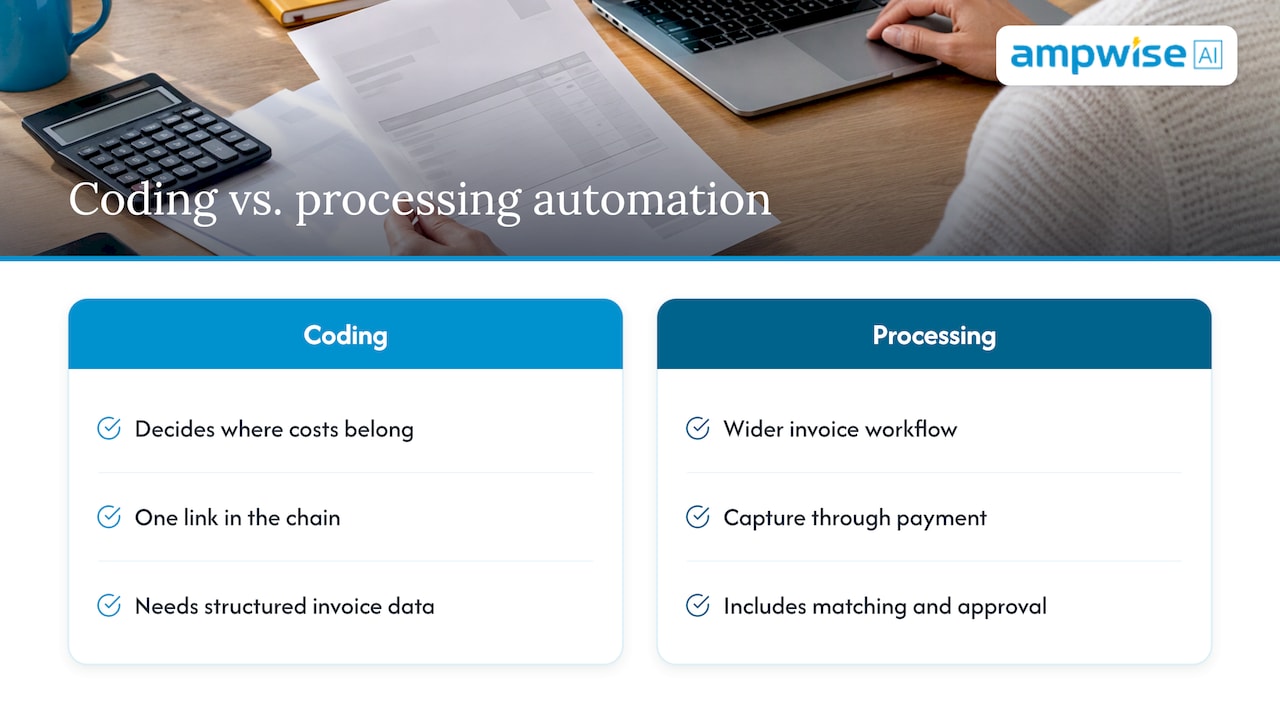
Invoice coding is the decision about where an invoice’s cost belongs in your books. A freight invoice might go to one expense account and a particular warehouse cost center. A raw material invoice might be tied to a purchase order and an inventory account. In a manual process, an AP clerk or a purchasing manager makes that call and types it in.
Invoice processing automation is the wider chain: capture, read, code, match, approve and pay. Coding is one link. That distinction matters when you shop or plan a project, because a tool that is excellent at the payment run may do little for the first mile, which is the email attachment that nobody has opened yet.
For wholesalers and manufacturers, the first mile is usually the problem. Suppliers send invoices in whatever form they like: a PDF from their accounting system, a scan of a paper document, an Excel sheet, a few lines in the body of an email. Coding cannot start until someone, or something, turns that into structured data.
How automated invoice coding works, step by step
The sequence is the same in almost every setup. What differs is how well each step copes with real-world mess.
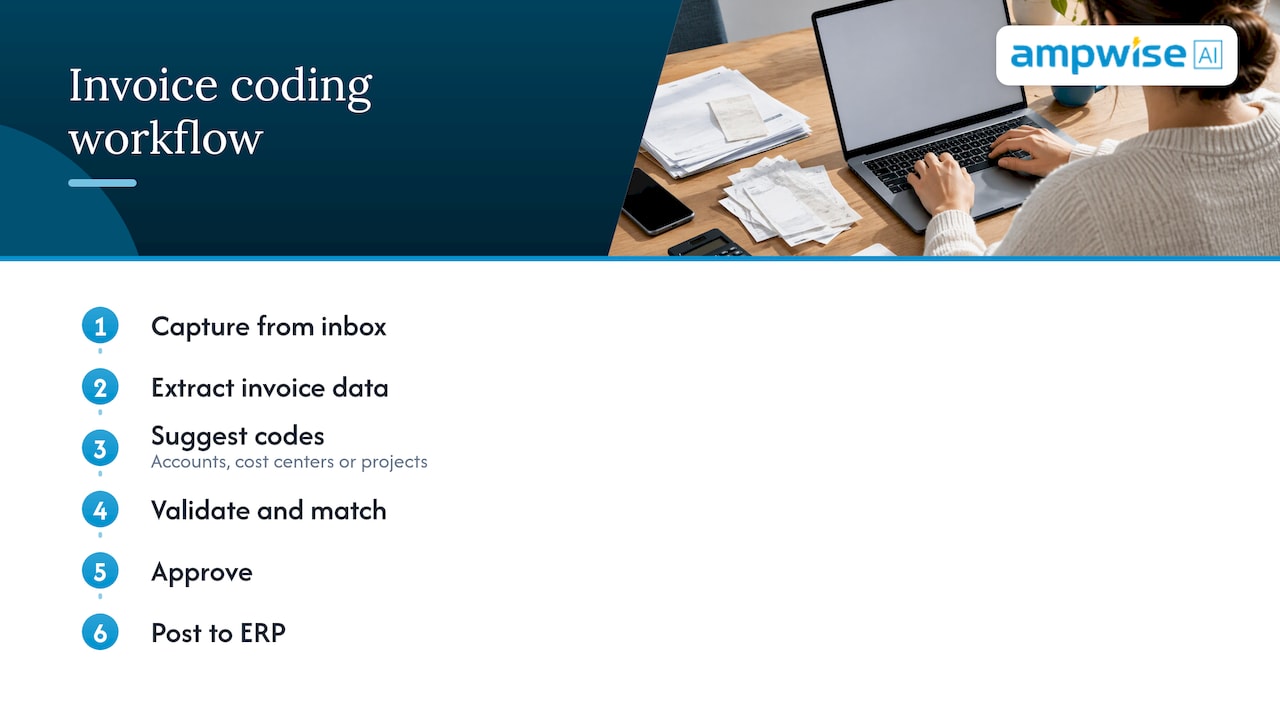
1. Capture from the inbox
The invoice arrives in a shared mailbox or a buyer’s personal inbox. The system has to find it, tell it apart from the order confirmations, inquiries and newsletters around it, and pull out the attachment. Where it goes wrong: invoices forwarded three times, attachments inside zip files, and invoices sent to the one buyer who is on vacation.
Ampwise works directly in Outlook and Gmail, so there is no separate portal for suppliers to learn and no change to how they send documents. It also labels emails and tracks their status, so you can see what has been processed and what is waiting. If your invoices mostly land in Outlook, our guide to Outlook PDF invoice processing covers the mapping to your ERP in more detail.
2. Extract the data
The software reads header data (supplier, invoice number, date, totals, tax) and line items (description, quantity, unit price, PO reference). Template-based tools need a layout set up for each supplier. That works until a supplier changes its format, or a new supplier shows up, or a scan arrives crooked.
Ampwise processes emails, PDFs, Excel files and scanned documents without templates, so a new supplier’s invoice does not need setup work before it can be read. We go deeper on field-level accuracy in our post on invoice data extraction for AP.
3. Suggest the codes
This is the coding step proper. The system proposes an account, cost center or project for each line, based on the supplier, the description, the PO and how similar invoices were coded before. Good setups show a confidence level, so low-confidence lines get routed to a person instead of being guessed. Finance teams should also expect a system that never invents a missing amount or code.
4. Validate and match
Next come the checks: does the invoice number already exist, do the totals add up, does the supplier match the vendor master, does the invoice agree with the purchase order and the goods received? This is where coding errors and duplicate payments are caught. Our piece on validating purchase orders before ERP release lays out three checks that apply well beyond POs.
5. Approve
A person confirms the data, or the system routes it to whoever owns the cost center. With Ampwise, verified data can be approved with one click and then entered into the ERP. The reviewer sees a ready-made entry rather than a raw PDF and a blank form. If you are designing the routing, see how to build an ERP approval workflow that keeps moving.
6. Post to the ERP
The approved entry is written into the ERP. Ampwise supports multiple ERP integrations and enters data into the systems you already run, so there is no retraining of staff on a new platform. Because the posting is direct, nobody retypes numbers from a screen.
Why exceptions decide the result
Every vendor demo shows a clean invoice sailing through. Your actual month includes invoices without PO numbers, partial deliveries, price changes since the order, freight added at the last minute and credit notes that reference nothing. These are the exceptions, and they are where your people spend their time.
That is why a useful way to evaluate automation is to ask how it treats the ones that do not go smoothly:
| Exception | What typically happens manually | What good automation does |
|---|---|---|
| No PO number on the invoice | Clerk emails the buyer and waits | Flags it, keeps status visible, routes to the owner |
| Price differs from the PO | Found late, often after approval | Caught at validation, shown next to the PO line |
| Duplicate invoice | Paid twice, recovered weeks later | Matched against existing invoices before entry |
| Unclear line description | Coded from memory or guesswork | Low confidence sends it for human review |
| Missing or unreadable field | Retyped from a scan | Left empty and flagged, never fabricated |
We cover a practical process for these cases in our guide to invoice exception handling. The principle is simple: automation should make exceptions faster to resolve and impossible to overlook, not hide them.
A worked example: a wholesaler with a shared mailbox
Take a hypothetical building-supplies wholesaler. Around 20 suppliers email invoices to one accounts payable address. Roughly half arrive as PDFs, a few as scans from smaller suppliers, and some as Excel sheets. Two clerks open each message, read the invoice, find the PO in the ERP, decide on the cost center and key it all in.
With an email-to-ERP setup, the flow changes like this:
- Each invoice is picked up from the mailbox and read, whatever the format.
- The extracted lines are checked against the PO and the vendor record.
- Clean invoices show up ready for one-click approval.
- Flagged invoices wait in a visible queue with the reason attached.
- Approved entries go straight into the ERP.
The clerks’ work shifts from typing to reviewing. This is the pattern behind Ampwise’s claim of cutting manual data entry by up to 90%, and why we see the effort as best spent on the exception queue rather than on entry. The same logic applies to orders and PO confirmations, which we describe in our post on order processing automation.
What to assess before you automate coding
Finance teams should ask pointed questions about control, not just speed. The INCPAS Corporate Finance Technology Report offers a useful framework for evaluating vendors. Its main points, translated for an operations or finance lead:
- Explainability. Can the vendor explain how the coding logic reaches a decision, and can you explain it to an auditor?
- Override logging. When someone changes a suggested code, is that recorded with enough detail to review later?
- Segregation. Are automated postings kept separate from manually entered journals, with their own approval path?
- Reproducible trail. Can you reconstruct inputs, parameters and outputs for any entry?
- Assurance reports. Does the vendor hold the SOC 1 or SOC 2 reports your auditors will ask about?
- Retraining governance. Who decides when a model is updated, and how is drift watched?
The same report recommends mapping your current workflow before you automate, so you do not digitize a bad process, and asking who owns the exception queue and how integration errors are logged. Bring these questions to any vendor conversation, ours included. We would rather you walk in with a checklist.
How to measure whether it is working
The INCPAS report suggests setting baselines before go-live: cost per invoice, time from receipt to posting, and the share of duplicate payments. It also advises defining 30, 60 and 90-day success criteria and setting a firm end date for running the old and new processes in parallel.
A practical scorecard for your first quarter:
| Metric | How to measure it | Why it matters |
|---|---|---|
| Receipt-to-posting time | Timestamp of email arrival vs. ERP entry | Shows speed gains and bottlenecks |
| Touch rate | Share of invoices a person edits | Reveals real coding accuracy |
| Exception rate | Share of invoices flagged | Where most handling time goes |
| Duplicate or error corrections | Count per month | Direct cost of mistakes |
| Hours spent on entry | Time sheets or sampling | Feeds the ROI case |
Pick a few of these, measure them for a few weeks before you change anything, and compare. Ampwise says its customers see a return within about three months; our post on ERP automation ROI shows how to build that calculation with your own numbers.
Getting started without a big project
You do not need to automate every invoice and every supplier at once. A sensible start is one mailbox, your top suppliers by volume and one ERP entity. Run it alongside the current process for a short, defined period, review the exception list weekly and expand once the touch rate settles. Our invoice automation guide describes a 2 to 4 week pilot for email and scanned invoices, and the broader B2B workflow automation post shows how the same approach extends to orders and inquiries.
If you are also weighing how much of the surrounding plumbing to build yourself, a look at choosing a workflow automation tool helps frame what general-purpose connectors can and cannot do. Invoice-specific work, with scans, free-text emails and ERP posting, is a different task from moving data between apps.
Where Ampwise fits
Ampwise is AI software that automates the extraction, validation and direct entry of orders, inquiries, invoices, PO confirmations and incoming goods from Outlook and Gmail into your ERP. It handles emails, PDFs, Excel files and scanned documents without templates, supports multiple ERP integrations, and lets you approve verified data in one click. Teams keep working in the inbox they already use.
If your invoices live in email and your people retype them into the ERP, take a look at Ampwise and see how the flow would run on your own documents.

Our perspective
We built Ampwise around a simple observation: the expensive part of invoice handling is rarely the coding rule itself. It is the distance between an email and a trustworthy ERP entry.
Most teams we talk to have a decent idea of how an invoice should be coded. What they lack is time to read every attachment, compare it with the PO and key it in without a slip. So we focus on that stretch: reading whatever arrives, validating it, and handing a person a verified entry to approve in one click.
We also think no template should be needed to do this. Suppliers will not change how they send invoices for you, and your staff should not have to learn a new system to cope. That is why Ampwise runs inside Outlook and Gmail and enters data into the ERP you already have.
The result we aim for is relief: less typing, fewer errors, a visible status on every document, and an exception queue your team can actually clear. Start small, measure honestly, and let the numbers decide how far to go.
Evert
FAQ
What is the difference between invoice coding and invoice data extraction?
Extraction reads what is printed on the invoice: supplier, number, dates, amounts and line items. Coding decides where those amounts belong in your books, such as the account, cost center or project. Coding depends on accurate extraction, so a reliable capture step comes first.
Can invoice coding be automated for scanned and emailed invoices?
Yes. Modern AI reads PDFs, scans, spreadsheets and even invoice details written in the email body. Ampwise handles these formats without templates, then validates the data and enters it into your ERP after approval.
Do I still need a person in the loop?
For most finance teams, yes, and that is a good thing. A reviewer confirms verified data or resolves flagged exceptions, which keeps accountability clear and gives auditors a trail. Automation takes over the repetitive typing and checking, so people spend their time on decisions.
How do I know if my business is ready?
If invoices arrive mostly by email, several people retype data into the ERP, and exceptions regularly stall payments, you are a good fit. Record your cost per invoice, processing time and duplicate rate first, so you can see the change afterward.